

Back when the trees were tall and game engines were small, there was no choice of whether to write your own — if you didn't have an engine, you basically didn't have a game. Some people bought someone else's engine and enjoyed those lovely imported contraptions, while others built their own, which took months, if not years.
This series of articles was born as notes in the margins of the wonderful book Game Engine Architecture. It's a big, thick book that covers every aspect of building an engine. But it lacks the nuances of practical development. And to see those nuances you need to understand not just the theory — GEA is mostly theory after all — but how a game's code works from the inside. To understand how, and most importantly why, the chosen mechanisms are used inside a game, to spot performance and architecture problems, how to find them and how to fix them — for that you have to understand how game engines work and how they were built.
If memory serves, Carmack said the best way [to make games] is to write your own engine ("The right move is to build your own engine"), to which many will object: it's not that simple at all. But the father of Doom is known not only for his contribution to game engines, but also for being fairly critical about the state of game engines in general, and about the advantages of building your own technology instead of using ready-made solutions.
This philosophy, which he has held throughout his career, came from the idea that your own engine gives developers full control over the technology and the ability to build solutions tailored to the specific needs of their projects.
This is part of the «Game++» series:
Game++. while (!game(over)) <=== You are here
But you know, everyone is right in their own way — there's no universal answer, it all depends on the specific situation. Maybe building your own engine isn't as hard as it seems? Why even do it? And what does "build a game engine" even mean?
I've worked with various game engines, built a couple of my own from scratch, and two more before those went into the trash. Three commercial games shipped on the first (third) one, without much success, and in the end it went to a studio in St. Petersburg for a crazy pile of evergreen raccoons, all of 70^2 of them — that was 15 years ago. And I've seen how developers use other engines, how they complain about them, how they talk about their own solutions. I studied the source code of other engines (open and not-so-open). And I think I have a couple of things to say on this topic, though I'll admit my experience may be somewhat biased or one-sided — I always wanted to make strategy games, but for some reason I was mostly offered shooters.
First big question — why?
First, second and third — it's a lot of fun, I promise.
Fourth — it's experience that many companies are willing to pay good money for.
You'll definitely learn a ton in the process, which will help you understand other engines better, and not just engines, and as a result help you make games in the future, even if you toss your own engine into the trash bin.
Speaking of the trash bin, the first and most likely the second engine will end up exactly there, judging by my experience and that of my friends — they don't talk about the rule of three systems for nothing.
Your own game engine is free only to the extent that your evening time is free — nothing is ever truly free.
An engine can be optimized for your own wishes (or the needs of a specific project) in terms of performance, iteration time, engine architecture and many other things. At some point I wanted hot-reload of configs in JS — a strange desire, but I had to learn JS and figure out how everything works under the hood of the VM. And then I got tired of textures from packs and wanted to do runtime texture batching from disk (a dynamic atlas). I have strange desires.
You'll have full control over how everything works inside and which technologies are used.
You can use your favorite programming language — though game engines have probably been written in every programming language on the planet; I've even seen one in Erlang. Never saw one in COBOL, but I bet that exists somewhere too.
You can make a very small distributable; the Akhenaten.exe binary is around 2 MB, considering that part of the resources and scripts are packed right into it, graphics of course are separate.
You'll probably want to make your engine open and see how others use it. I don't really understand why you'd hide the engine code specifically — an engine is not a game — but even if you put the whole repo (with all the resources, models, music, scripts and a detailed build description) on GitHub, only 0.1% of the people who clone the repo will manage to build it. The ones who do manage can be invited to the studio as developers. Hmm, Unreal actually pulled off exactly this, offering positions on the dev team to people who stood out in commits.
You can even sell your engine, but keep in mind that supporting an engine for someone else's wishes is a separate circle of hell.
You'll never be disappointed because the engine developers didn't implement a feature you need.
In tech interviews (verified at more than one studio) the conversation sooner or later drifts toward the decisions you made in your own engine, and now you're the one asking the questions — and how do you do it over there? :)
For me the first two and the last point mattered most. Learning is fun; learning and making a game is fun squared. And I just love programming, doing things the language "supposedly" doesn't allow, digging into algorithms and systems, poking around in the complex details and subtleties of the language. And the heart-to-heart chats at interviews are a bonus on top.
People complain about engines: this doesn't work, that broke, this new thing doesn't support that old thing, and that old thing was requested ten years ago and still hasn't been added. Of course there are reasons for all of this — if you've ever worked at a big company, you'll definitely understand me. But it's always easier to blame someone else than yourself. If you need that feature so badly, just go and write it, no? No, because it's not your engine. The engine is someone else's — but the disappointment is yours. That's expected. Just as it's expected that a feature you need in your own engine will be added when you actually need it.
Second big question — do you even need to?
Your own project is always hard and takes a lot of time, really a lot of time. Of course, much depends on the end goals, but don't expect to write a clone of Unreal Engine in a year, especially considering that Unreal itself has been written for some twenty years by a team of top engineers, and now by the community too.
Your own engine will always be missing something. You'll need to spend long years of hard work to reach even a fraction of the functionality and usability that mature engines have.
You'll never be able to compete with the big industrial engines like Unreal, Unity, CryEngine or even Godot. Unless you're a big and rich studio, but then this article probably isn't of much use to you anymore, because you already have your own engine, or you use one of the above.
In 99 cases out of 100, engine developers never get to the actual game if the goal is to develop an engine. That's a straight path to throwing the project away.
Most people will think you're a very unwise person, just for spending your time making your own engine.
It's better to spend time refining features and fixing bugs in Unreal — that gives more experience with Unreal and bonus points when getting a job at a studio that uses it.
If you've read this far, it means I haven't convinced you that this is a thankless endeavor, so let's move on...
Here's the thing to understand: the cost of developing your own engine will never pay off; there will be no moment when, as of yesterday, the engine started breaking even. No, even for top studios this is a loss-making line item. Games make money, engines don't. From Unreal's own report, the cost of engine development over just the last four years was more than $160 million — Epic effectively makes a new AAA game every year, we just don't see it.
But once you've written a good foundation, you can reuse it again and again, improving it with each new game. If your goal is to ship a game as fast as possible, just pick a ready-made engine and use the functionality it has. But if you want to grow as a developer, build yourself a base for future projects — not only in gamedev — and you have the time, energy and patience, then go for it; your own engine is perhaps the best application of your knowledge!
So, is it worth making your own engine? At the very least, it's worth thinking for yourself and not relying on the opinion of the author of some random article on Habr.
What is a game engine?
Is SDL/SFML/Allegro a game engine, even though countless indie games have been made with them? Definitely not — these are libraries wrapping platform code, even though they can do everything a basic game engine can. What about Vulkan/DX11? Definitely not — that's a graphics API. What about FMOD/WWISE? Also no — but they let you implement a 2D/3D scene, an audio one, granted.
Now imagine a small project that combines Allegro, DX11 and stbi (a library for loading images of various formats) to draw moving sprites on the screen. Would that be a game engine? Also no, though very close — a game engine appears when there's a game, or games, made with it. Until there are games, it's just a set of libraries glued together somehow through cmake.
Maybe it's just a combination of graphics, animation and user input handling? A game engine without a game is just a set of tools, libraries and other components designed to help create games. If that definition seems vague, almost useless to you — it's not just you.
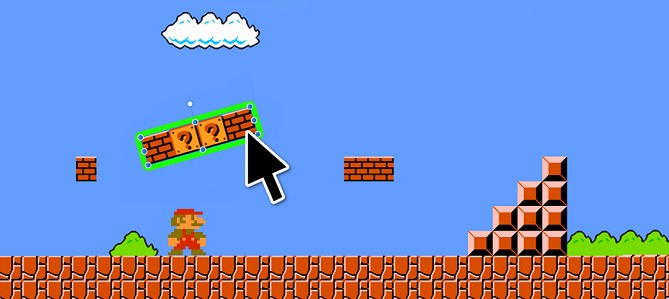
If you're making a 2D pixel-art platformer, do you really need complex material editors and kilometer-long shaders, seamless geometry and global illumination for it, 3D physics with inverse kinematics and networked multiplayer support? Unreal has all of that and at decent quality, but do you need all of it? And it requires experience, getting used to, and the ability to set it up and use it.
All you'll need is to handle input, render sprites, maybe even raw PNGs on screen, and play sound. All of that can be written in a couple of days following open guides on YouTube. And those couple of evenings will be spent usefully, and now you've moved on to the main thing the whole thing was started for — making the game.
And if you want to create a AAA hit with top-tier graphics, physics and everything else? Then yes, you'll need all those incredibly complex systems. And a couple of dozen free years of your life to work only on the engine every day and implement all of it — yes, modern game engines have gone hopelessly far from the retro platformer.
What can a game engine do?
The first thing I want to say is that an engine can be small, built specifically for your game. But let's be honest — we're spoiled by the capabilities of big engines and carry these expectations over, expecting the same behavior from everyone else. But if an engine is tailored from the start for one particular game, having few features is also normal. Nevertheless, most game engines will be able to do the following:
Spin the game loop and handle events
visual level and UI editors
logic updates
a scene/level system
an entity manager
a game state serialization system
state rollback (for testing and debugging)
a variable inspector
Handle input
keyboard, mouse, controller, touch
multi-input support (simultaneous controllers, local co-op)
remappable keys and control profiles
Artificial intelligence
an AI and behavior debugger
a built-in navigation system, pathfinding across the map
dynamic navmesh updates
a behavior system (e.g. behavior trees or FSM)
perception (visibility, hearing, aggro)
Handle physics: 2D or 3D
joints (connections between objects)
raycast (line collision checks)
collisions and triggers (colliders)
dynamics (mass, forces, impulses)
Load and manage resources
packing resources into archives
textures, models, sounds, scripts, levels
the ability to load formats (via libraries:
stb_image,Assimp,FMOD)caching and reusing data
support for hot-reload (reloading on the fly, without restarting the game)
tracking dependencies (if a shader uses a texture — reload them together)
generating builds for different platforms
object and component inspectors
hot-swapping code or data (hot reload)
support for "prefabs" — object templates
support for auto-update and patches
Render the final image
CPU/GPU/memory profilers
skeletal animation
blend trees and animation layers,
abstractions over low-level APIs (OpenGL, Vulkan, Direct3D, Metal)
support for cameras, perspective, lighting, shadows, post-processing
the ability to draw both a 2D UI and a 3D scene
materials, shaders, LOD, batching, occlusion culling
Support a scripting language or languages
writing object behavior in a convenient language (Lua, Python, GDScript)
not rebuilding the game on every logic change
implementing hot-reload
Audio
play media, sounds and effects
multi-channel sound (music, effects, speech)
sound positioning
effects (echo, reverb, filters)
mixing (combining sounds into a final stream)
volume control by group (music, UI, effects)
loading formats (via OpenAL, SDL_Audio, FMOD, Wwise)
User interface
buttons,
sliders,
text,
lists, tabs, panels.
Networking
unit tests for game systems
recording and playback of sessions
sockets, UDP/TCP
game state synchronization (object states, player actions)
replication, interpolation, prediction
lobby system, matchmaking, authorization
Having an architecture that ties all these subsystems into a single whole is optional — for now optional — but you have to understand: your particular engine may contain only part of this list, and still remain a game engine. Not every game needs all the features at once — otherwise no indie game would ever see the light of day.
Programming: the nuances
This may sound strange, but classic programming isn't mandatory for implementing game logic. Just look at visual programming systems (Blueprints, VisualScript, ICS), which have existed for decades and let you create complex mechanics without writing the code itself. This is especially popular among designers and artists who want to quickly prototype ideas without diving into the syntax of programming languages.
And yes, designers write code too; visual programming is a full-fledged kind of coding, the words class, if, for just look different. The point, however, isn't the terms but the practical aspects. Implementing visual scripting in an engine requires building specialized tools: node editors, a visual debugger, data-flow visualization systems, optimizers and a lot more. This significantly complicates engine development; for example, in Unreal Engine there's a huge amount of low-level C++ code behind Blueprints, comparable to the renderer or the animation engine.
Classic code remains the most universal and flexible way to implement logic, but it keeps losing ground. It doesn't depend on the limitations of visual tools and lets you work at the level of system resources. However, the classic approach drags along classic problems, like recompilation, stopping the engine to rebuild and losing time on all these operations, not to mention that training designers in various programming languages like C++ turns into big financial and time costs, while the cost of an error is the same as for a game programmer — an engine crash.
That's why embedded logic uses scripting languages like Lua, Python, JS, Angel — especially if the engine is written in C++. They're much more forgiving of runtime errors and save a ton of time. Even if you develop an engine from scratch, it's easier to build in scripting capability and the use of the language the engine itself is written in from the start — this reduces overhead and simplifies integration.
... and the myths
Building an engine still requires programming; there are no short and easy paths here. Which language to choose? Honestly, it's not critical — the best language is the one you know; an experienced developer will optimize performance-critical spots much better in their own language and avoid beginner problems along the way. Low-level languages like C++ give transparency in resource management, but also require qualitatively more understanding of architecture and development theory.
C++ — the gold standard in gamedev thanks to performance and control over memory.
Rust — gaining popularity as a safe alternative to C++, but big studios still steer around it, limiting themselves to small modules from enthusiasts or as experiments.
C# — used in Unity, and that's a good incentive for others to start looking at it with interest; convenient thanks to .NET and rich libraries.
Python, Java and a million others are used as a VM for prototypes — not everyone is ready to learn C++, despite its performance.
Main window
Hidden text
EABase is a small set of header files that define platform-independent data types
https://github.com/electronicarts/EABaseMinimal cross-platform standalone C headers
https://github.com/floooh/sokolstb single-file public domain libraries for C/C++
https://github.com/nothings/stbAbseil Common Libraries (C++)
https://github.com/abseil/abseil-cppA C++ Template library, developed by Andrei Alexandrescu
https://github.com/dutor/lokiGeneric game loop implementation
https://github.com/ggabriel96/lasso
Most games need a window to work at all. Even browser games are no exception here: the window can be either the whole web page or a specific <canvas> element inside which the game runs. Creating a window usually happens through platform-dependent mechanisms; these low-level interfaces tend to look bulky and inconvenient, and moreover, for each platform (Windows, Linux, macOS, iOS, Android) you'll have to write separate window-creation code — but it's written once. And then nobody ever comes back to it.
Besides the window, there's usually a graphics API context (OpenGL, Vulkan, DirectX), which is also created through scary platform-dependent calls. But again, you'll have to write them only once, or take a ready-made library that takes all of this on itself (SDL2, glfw, SFML or any of a thousand other libraries).
After creating the window, the next step is to set up the game loop — it's what will handle events, update the game logic and redraw the screen.
The game loop
A few useful links
Animated sprite editor & pixel art tool
https://github.com/LibreSprite/LibreSpriteSource code analyzer for large code bases
https://github.com/myint/cppcleanAddressSanitizer, ThreadSanitizer, MemorySanitizer
https://github.com/google/sanitizersMemory debugging, memory leak detection, and profiling
http://valgrind.org/Tool for static C/C++ code analysis
http://cppcheck.sourceforge.net/
Here's what unites virtually all games and game engines, although the loop itself may be buried deep inside the engine, replaced by abstractions or callbacks. But ultimately the game loop code looks like this:
int main()
{
    createWindow();
    init();
    while (isRunning())
    {
        handle(InputEvent());
        updateFrame();
        drawFrame();
    }
    shutdown();
    destroyWindow();
}
The game loop keeps the game running; without it the main function would simply finish and the game would close. There are many ways to represent the loop in an engine's API. It can be fully explicit, when the engine user writes while (engine::isRunning()) somewhere in their main function.
It can be hidden inside the engine, for example in some engine::run() function which, in turn, calls some functions provided by the user (callbacks). Whatever you choose, you'll still need a game loop.
Input handling
Basic solutions
Cross-platform library for gamepad input
https://github.com/mtwilliams/libgamepadCross-platform C++ input library supporting gamepads, keyboard, mouse, touch
https://github.com/jkuhlmann/gainputCross-platform 2D game library
https://github.com/jhasse/jngl/KlayGE is a cross-platform game engine, plugin-based architecture
https://github.com/gongminmin/KlayGECross-platform 2D game engine
https://github.com/nCine/nCine
User input is one of the basic components of any game, even if all it has to do is tap a hamster.
At the most basic level, any input is handled with platform-dependent APIs like WinAPI, X11, Cocoa, but they're inconvenient to work with: they're not complex, but very verbose and require individual code for each supported platform. But almost all of these APIs provide a way to pull events into a function like pollEvents(), with which you can then sequentially receive events from the user.
When it's time to integrate input into a game engine, different approaches are possible. One of them is to give the user direct access to the event system. In this case the game developer requests events through pollEvent() themselves and decides how to handle them themselves.
The basic structure of event handling usually looks like this: on each iteration of the game loop an event-handling function is called, where all the incoming events are parsed sequentially. Depending on the event type, the corresponding functions are called or certain actions are taken — for example, handling mouse movement, key presses or window closing.
while (engine.isRunning()) {
    Event event;
    while (engine.pollEvent(event)) {
        switch (event.type) {
            case Event::MouseMove:
                application.onMouseMove(event.mouseX, event.mouseY);
                break;
            case Event::KeyPressed:
                application.onKeyPressed(event.keyCode);
                break;
            case Event::WindowClose:
                engine.quit();
                break;
        }
    }

    engine.update(); // Game logic
    engine.render(); // Frame rendering
}
This way gives maximum flexibility, but requires more code from the user and knowledge of the event structure.
Another option is to embed event handling inside the engine and give the user only callback functions. This makes the initial development simpler and faster, but requires a well-thought-out architecture for registering these callbacks.
void onMouseMove(MouseEvent event) {
  application.onMouseMove(event.mouseX, event.mouseY);
}
void onKeyPressed(KbEvent event) {
  application.onKeyPressed(event.keyCode);
}
void onWindowClose(AppCloseEvent ev) {
   engine.quit();
}

int main() {
  engine.subscribe(onMouseMove);
  engine.subscribe(onKeyPressed);
  engine.subscribe(onWindowClose);
  while (engine.isRunning()) {
      Event event;
      updateFrame();

      engine.update(); // Game logic
      engine.render(); // Frame rendering
  }
}
Graphics
SDK
Universal Scene Description
https://github.com/PixarAnimationStudios/USDAn open source render engine
https://github.com/kimkulling/osreA vector graphics renderer for bgfx
https://github.com/jdryg/vg-rendererLightweight and modular C++11/C++14 graphics middleware
https://github.com/mosra/magnumOpenGL C++ Graphics Engine
https://github.com/JoeyDeVries/CellSimple and Fast Multimedia Library
https://github.com/SFML/SFMLVulkan SDK
https://github.com/ARM-software/vulkan-sdkHigh level vulkan 2D vector-like graphics api
https://github.com/nyorain/rvgDirectX Graphics samples
https://github.com/microsoft/DirectX-Graphics-SamplesRendering base for animation and visual effects
https://github.com/appleseedhq/appleseedA fully featured, open source, MIT licensed, game engine
https://github.com/godotengine/godot
We already have a window. We can even react to the mouse and keyboard somehow. But… we can't show that reaction yet. Time to deal with graphics. Honestly, 3D always came hard to me; I always envied my buddy @megai2, who effortlessly writes renderers for anything, from a PlayStation to mobiles.
Most window-creation libraries, such as SDL2, already include 2D graphics support — you can draw right into the window, with textures, or by manually filling pixels with your favorite colors. Primitive, but honest.
Let's say the engine is tailored for 2D games with tiles and sprites. Then you'll most likely have to implement something like drawSprite(image, x, y). Possibly with support for all sorts of niceties: scaling, rotation, color tinting, desaturation, alpha blending. Internally this can be implemented manually — by directly copying pixels with some calculations and blitting. Or through another library like cairo, which internally turns out to be a pretty decent renderer, capable of, if not everything, then a great deal. Or through OpenGL/DX/Vulkan, if your soul craves hardcore and speed.
Or you can choose not to specialize at all and just hand the engine user universal wrappers, the way most libraries like SDL/SFML/Allegro do — let them figure it out themselves. In my implementation for Pharaoh there's a wrapper over SDL2 (which can use native GAPIs), but there's no full-fledged renderer in the usual sense. For each engine I wrote my own rendering system from scratch. On one hand, it was painful. On the other, you can experiment with graphics. However the rendering system is built, sooner or later you'll need to render text. For the UI, debug info and so on. You can, of course, draw the letters manually with pixels, but it's better to take a proper font library — for example, FreeType. For masochists and Unicode lovers — harfbuzz. Just don't write your own font parser — that path leads to pain.
Assets
Resources
ASTC texture decompression in C++
https://github.com/richgel999/astc_decDynamic texture atlas
https://github.com/septag/atlascTexture Packer for Game Development Using MaxRects Algorithm
https://github.com/huxingyi/squeezerImage loading library
https://github.com/rampantpixels/image_libFast PNG encoder and decoder
https://github.com/lvandeve/lodepng
Resources are everything that brings the future game to life: sprites, configs, scripts, textures, sound files, 3D models, levels, AI and other pieces of content, without which your whole great rendering and physics system is just an expensive doodad on GitHub.
How to store and load them? Well… there are, as usual, a million ways.
You can, for example, compile all resources into one big binary blob and bake it inside the executable, the way many games did and still do. Android and iOS did this at first. The advantages? Everything is right there, everything is fast — no "loading", no file paths — you just grab an array of bytes and work with it as a resource. Sometimes this saved various projects, genuinely saved them, and let you pass certification for Sony or the stores — and so what if the binary is 700 megabytes, that's all the cat's fault and the junior programmers', who wrote a pile of templates.
But of course there are downsides too. You won't be able to change a single asset without recompiling the whole game. Even if you just want to change the color of one pixel in a texture — wait for a build. And it also makes modding practically impossible. How will players insert their custom hats if all the content is sealed into the .exe?
You can store resources as ordinary files in an assets/ folder next to the executable. Then the engine simply loads the needed file when the level starts, if we didn't worry about performance ahead of time. This method is ideal for development: fast, transparent, you can go into the folder at any moment, replace a texture and see the changes in the game. And it's a real gift for modders: take it, change it, add to it — everything is open.
You can go further and pack all the assets into an archive. It can be an ordinary ZIP (and then zlib will come in handy), or a homemade format tailored to the engine's specifics. Big commercial engines, by the way, usually go exactly this route. Archives are convenient to load, convenient to cache, and nobody pokes around in them with their hands… except those who really want to. This is where VFS (Virtual File System) or archives come to the rescue, understanding what lies where and how to get it out.
However the assets end up being stored, they still need to be turned somehow from raw bytes into meaningful data. Here you'll need format libraries, stb_image — to turn a PNG into an array of pixels. Or various JSON ones — to pull entity information out of JSON-like configs, if you haven't become disillusioned with JSON as a config format yet. At some point the team comes to understand that a purely declarative config format doesn't cover all cases, and then VMs (Virtual Machines) for js/lua/squirrel/angelscript come into the engine — they're supposedly scripting languages, but are used for parsing configs — or a homemade format is invented, which in the end also arrives at a VM-style look.
And you can also — I'd say you should, as the second step after configs — add support for hot reloading of assets, so you don't restart the game a thousand times a day. That is, you change a picture, a sound or a config — and hop, it's all already picked up right there in the game. Magic? No, just one more reason why the resource manager grows into a monster that the rest of the engine suffers from.
Audio
Sound&Fx
Portable audio engine for games
https://github.com/jarikomppa/soloudC++ graph-based audio engine
https://github.com/LabSound/LabSoundMP3 decoder single header library
https://github.com/lieff/minimp3Portable speech synthesis system
https://github.com/festvox/fliteFx sounds generator
https://github.com/raysan5/rfxgen
Sound output is, as you've probably guessed, hell on platform-dependent APIs. Ugly, unintuitive, capricious; the Xbox in particular loves to spit out exceptions if you write too much into the buffer, and… well, if you put in less than you allocated memory for the buffer, it'll also spit out. I'm not a real welder, i.e. not an audio programmer, but even a small dose of adventures was enough to understand — if you just want to play a sound, get ready to suffer. Or… you can take a library that hides all this nightmare behind a normal interface. For example, OpenAL or SDL2. Lately I've been using the latter, because it's very forgiving of errors, even if you do something completely wrong.
These libraries usually expect from the engine a so-called audio callback — a function the system will call (usually from a separate thread) dozens or even hundreds of times per second. Each call — you have to return a bit of audio data — everything else is your concern. You want to — twiddle your thumbs in silence. You want to — play a single MP3 in the background. But most likely you'll need "a bit more": music, effects, voice, all in different threads, with different volumes, with smooth fades, without clicks, without jitter, with reverb effects… well, you get the idea.
For all of this to work as it should, you need a mixer. Not a human, of course (though sometimes that wouldn't hurt), but an audio mixer — a library that will combine the many sound streams into one, carefully control their volume, filter out sharp peaks, add effects and keep the sound from turning into mush if everything plays at once. Especially if a battle suddenly starts in your game with 15 sounds of different units, fanfares and tense music.
A good engine usually implements its own audio mixer. It can be big and complex, with mixdown and reverb, effects and post-polling, or simple with four channels and background music, but the essence is the same — the mixer works with abstract sound streams, lets you combine them however you like, and on output produces one final stream that's already fed to the audio output. You should probably try writing your own at least once, to understand how it works. Or you can look for a library that already does all of this — mixes, balances, compresses. There are probably hundreds of them… but honestly, I didn't really look. In the end I wrote my own on top of SDL2. At least now I know how every clicking piece of crap in the headphones works.

Physics
Good solutions
Box2D is a 2D physics engine for games
https://github.com/erincatto/Box2D2D physics engine for games
https://github.com/google/liquidfunNewton Dynamics - real time simulation of physics environment
https://github.com/MADEAPPS/newton-dynamicsFluid simulation engine
https://github.com/doyubkim/fluid-engine-devInvk - Inverse Kinematics Library
https://github.com/ramakarl/invk
Honestly… most games don't need physics at all. Real physics, that is — with forces, impulses, friction and all that academic baggage. Most need something simpler: animations, logic, scripts — the things that create the impression of physics while having almost nothing to do with it.
Take Civ VI, for instance — one of the most complex strategy games of our time. But physics isn't needed there. At all. Or various city-builders — banal, but houses don't fall, roads don't crack, and nobody computes the falling vector of a water tower. Simply because it's not needed. Why complicate things? Yet both Civ and Cities: Skylines for some reason drag in a dependency on PhysX, and possibly don't just drag it in but actually use it somehow.
A platformer or a top-down 2D RPG — all the "physics" is usually limited to moving the character and simple collisions with walls, enemies and crates. This is written in a couple of evenings, unless, of course, you get stuck on every line, as I did trying to figure it out. The main thing is that it'll all be under your control: want the hero to slide like on ice — sure. Want the enemies to bounce absurdly like rubber ducks — go ahead.
And if you have too many collisions and everything starts lagging — you can optimize. Spatial hashing, quadtrees, and a range limit from the main character. But… if you're still stubborn and know for sure that you'll need real physics — take a ready-made library: Box2D for 2D or Bullet for 3D. Don't reinvent the wheel; there will be plenty of those in a homemade engine anyway.
And when you need to understand how such engines work under the hood — it's better to watch a video on YouTube from the author of Box2D. He explains in great detail how physics with impulse-based constraints works and generally gives a rare look from the inside.
Once I thought physics was about mass, velocity and formulas. Now I know that real physics is when at 3 a.m. you're trying to figure out why the character gets stuck in a staircase whose collision mesh didn't load.
Scripts and Configs
Configs
Simple .INI file parser in C, good for embedded systems
https://github.com/benhoyt/inihHeader-file-only, JSON parser serializer in C++
https://github.com/kazuho/picojsonJsmn is a world fastest JSON parser/tokenizer
https://github.com/zserge/jsmnMesh loader for OBJ, glTF2 and PLY
https://github.com/jing-interactive/meloC++ Library for reading and writing FBX files
https://github.com/jskorepa/fbxA C++ library for reading, writing, and analyzing CSV
https://github.com/vincentlaucsb/csv-parserC++ SVG library
https://github.com/svgpp/svgppA YAML parser and emitter in C++
https://github.com/jbeder/yaml-cppLight-weight, simple and fast XML parser for C++
https://github.com/zeux/pugixml
Scripts
Embedded Scripting Language Designed for C++
https://github.com/ChaiScript/ChaiScriptHigher level programming in C
https://github.com/orangeduck/CelloLua 5.3.4 re-written in C++ 17
https://github.com/Rseding91/LuaPlusPlusA simple Python 2.7 interpreter, with predictable memory management
https://github.com/shooshx/zippypyEmbedded JavaScript engine for C/C++
https://github.com/cesanta/mjsMuJS lightweight Javascript interpreter designed for embedding
https://github.com/dalerank/Akhenaten/tree/master/ext/mujsThe official mirror of the V8 Git repository
https://github.com/v8/v8daslang - high-performance statically strong typed scripting language
https://github.com/GaijinEntertainment/daScriptProgramming language Squirrel
https://github.com/albertodemichelis/squirrelAngelScript is a game-oriented interpreted/compiled scripting language
https://www.angelcode.com/angelscript/
Sounds trendy and convenient, it seems. In reality — one more language, one more layer of debugging, one more set of debug tools and one more reason why at 3 a.m. you have to dig through the log with prints.
What is it, anyway? Essentially, it's a part of the game logic written not in the engine's language (e.g. C++), but in another, lighter, often interpreted one. Lua, Python, GDScript, Angelscript, JavaScript — pick any flavor.
... it's not about performance or FPS
It's about the number of features a designer manages to crank out in an evening. In a low-level language like C++ every line is like a climb up a mountain. Yes, powerful, precise, but hard, and you have to recompile the game.
... it's about convenience and development speed
In scripts it's like riding a bicycle: not scary, fast, fun and convenient. In Lua, for instance, you can knock out a new enemy behavior pattern in about fifteen minutes and immediately see the result. No compilation, no restart. That's priceless, especially when a game designer is rushing you, or you yourself — right before a demo to the bosses.
... surprisingly, it's about safety
Scripts usually run in an isolated environment. That means if a modder wrote something weird — they'll break only their own mission, not the whole game. You can restrict scripts' access: give them the ability to work only with the objects you need. Set limits, interpret exceptions, and in the worst case — just don't run anything suspicious. You won't get this kind of flexibility in C++. There, any crooked plugin is a potential crash.
... it's about the reconfigurability of the project as a whole
If you've ever had to rebuild a project because of changing a single AI parameter, congratulations — you didn't think about configurability; hardcode is rarely a good thing. Hot-reload is the ability to change code during the game. Added a condition — hit "save" — and it already works, even if the game is running, even on the third mission. Compilers still aren't fully capable of this (well, almost incapable), but script interpreters — do it all in the best possible way, but see point 1.
... it's a door for the community
A door into the engine. No matter the size of the engine or the game — if you want the community to add new missions, enemies, dialogues, mini-games and even broken economic simulations — you need to give them a simple and safe way to do it. Lua, Python — these are familiar languages, written by schoolkids, students, enthusiasts. C++? Don't even think about it. Nobody will deal with a build server and compiler versions. And you probably won't want to read bug reports afterwards from a person who "just replaced a variable in a header file".
... it's — you can't please everyone
lua — the de facto standard. Small, fast, embedding it — 5 minutes. Documentation — an ocean. Parallelizes very well and works perfectly single-threaded.
python — gorgeous, but hard to embed. Initializing the interpreter is a quest in itself. And yes, the GIL, which is why many switch to lua.
js — embedded versions have proven themselves well both in memory footprint and speed.
GDScript — only if you're Godot.
AngelScript, Wren, Squirrel, emc — relatively niche; had they come out a little earlier than Lua, they'd have made a great replacement for it, but as is — something between C and Lua.
... a plus is two minuses, sometimes moreDebugging — pain. You'll have to write the debugger yourself, or rather assemble it from rakes and tears.Performance (see point 1) - scripts are slower. Sometimes much. Sometimes — so much that rewriting the logic back into C++ begins.The bridge between languages. That's the very layer where bindings and wrappers are written. Where types start to get confused. Where strings become char*, std::string, const char*, LuaStringView and all of it at once.Unpredictability. A script can be written by anyone. And write anything. Including an infinite loop or enemy.hp = -9000.
... more often — a salvation. sometimes — a headache.
Sometimes — a catalyst for new ideas and chaos. They don't suit everyone, not always, and not everywhere. But if you do everything right — you'll be able to edit the game's logic during the game, without recompilation, without restarts, without extra hours of waiting.
Networking
Not much here
A C++ header-only HTTP/HTTPS server and client library
https://github.com/yhirose/cpp-httplibhttp request/response parser for c
https://github.com/nodejs/http-parserFast C++ web framework
https://github.com/ipkn/crow
Sometimes everyone dreams about this. Synchronous worlds, co-op, PvP, MMO, or at least a chat between players. And then you open Wireshark and start dreaming about only one thing — that all of this just works.
Let's start with the good news: maybe your game doesn't need it at all. If you're making an offline game, a puzzle, a platformer, some "SimTower with frogs" — you can forget about networking. But if it occurred to you to "make multiplayer" — get ready. You're now stepping onto a path of pain where everything depends on the details. No universal architecture exists.
In modern languages (C#, Rust, Go) there will already be decent abstractions for working with sockets. Async calls, convenient coroutines and all that. In C++ (my condolences) — you'll most likely have to use something third-party like RakNet/Enet, not super modern, but reliable libraries proven by time and a ton of projects. But let's be honest: sockets are only the beginning. Connecting to the server is 1% of the work. After that the real fun begins. What even is a "network engine"? Good question. I asked myself the same when I was writing my first co-op prototype. Never did find the answer:
state synchronization between players
input prediction and rollback (rollback netcode)
interpolation, extrapolation, smoothing
distribution of roles (server authority, client copies, etc.)
dealing with latency, packets, losses, delivery order
a secure communication protocol
encryption (you don't become paranoid for no reason)
Sounds hard? It is. And you also need:
A server (a headless version of the game? AWS? homemade?)
Authorization
Object replication (your
Uniton the server and on the client are not the same object!)Logging everything that happens (otherwise how will you catch the bug later when a player suddenly ends up with a unit of the wrong type?)
Cheaters, a separate story — neither defeated nor broken
A while ago, on the hype wave of the second Counter-Strike, I wrote a couple of multiplayer prototypes. With friends. For fun, on Irrlicht. They almost worked. Until the first frame, when one friend's instance started moving without real events, and the other — hung in a wall at that time. That's when I understood: making reliable, responsive and flexible multiplayer is a separate profession. If you want to do it alone — you'll need not only knowledge, but also something to fend off the men in white coats with.

Artificial intelligence (AI)
Basic solutions
Procedural world generator
https://github.com/rlguy/FantasyMapGeneratorEntity-component system
https://github.com/skypjack/enttFinite State Machine implementation using std::variant
https://github.com/mpusz/fsm-variantA lightweight Behavior Trees Library
https://github.com/miccol/Behavior-TreeNavigation-mesh toolset for games
https://github.com/recastnavigation/recastnavigationRuntime NavMesh actions
https://github.com/Unity-Technologies/NavMeshComponentsPath finder and A* solver
https://github.com/leethomason/MicroPather
My favorite topic, because besides optimizations, for the last seven years I've been doing exactly monster AI in various guises, swarm behavior and group BTs. You may not believe it, but not every game needs strong AI, if it needs AI at all. And those that do most often get by with a couple of lousy scripts that say "Oops!" on a timer and run into a wall.
AI is just code. If you can write code in the engine — congratulations, you already have AI support. All game "intelligence" is just a pile of ifs and switches pretending the NPC is "thinking" something. Everything else developers built on top of these two building blocks:
Behavior Trees (BT) — a hierarchy of tasks where the NPC "thinks" about what to do. Reads well, easy to debug, but often turns into endless logic duplication and hellish nesting.
Goal-Oriented Action Planning (GOAP) — the AI itself chooses how to reach a goal. Cool, smart. But writing a planner — pain.
Finite State Machines (FSM) — states and transitions between them. Simple, effective, but quickly grows into spaghetti FSM.
Utility AI — everything on numbers and weights. A kind of FSM subspecies where there are no pre-written transitions between states. Flexible, even too much, and therefore unpredictable.
HTN, BT+ML, Neural Nets, Reinforcement Learning — sounds like magic. Works mostly in papers.
Pathfinding — the A* algorithm or its variants, plus a bit of magic so they don't get stuck in a corner.
Navmeshes — you can build them by hand or use ready-made tools (Recast, NavPower, etc).
Decision system — in any game it all eventually comes down to: "see the player — attack", "don't see — look for the player", "low HP — run away".
Some time ago I wrote a library for Behavior Trees. Working, simple, with convenient debugging, an editor and all the rest. Maybe it's worth open-sourcing, but the support contract with the customer hasn't ended yet — it turned out to be a cool thing, like UE blueprints but with a sane debugger and replays.
But the more it was modernized and refined, the more often I started noticing how designers, instead of building beautiful trees and following "divide and encapsulate" patterns, just shove all sets of behaviors into one long DoEverythingAndRepeat sequence. And you know — it worked pretty well.
AI is first and foremost about how to entertain the player and not let them get bored, not about intelligence. Let the NPC be dumb — the main thing is that it behaves the way the player wants. Let it be predictable, but that makes it easier to memorize patterns, and tactics only benefit from it.
Let it not be a real "AI", but just a competent script — at least it works stably, entertains the player and acts dumb. AI is not about intelligence. It's about the illusion of intelligence. And if you manage to make the player believe that someone smart is playing against them — then you did everything right.
UI
A few links
Elements C++ GUI library
https://github.com/cycfi/elementsHigh-performance HTML renderer for game
https://github.com/ultralight-ux/UltralightSkia-based C++ UI framework
https://github.com/skui-org/skuiUI inspired by Unity IMGUI
https://github.com/raysan5/rayguiTiny immediate-mode UI library
https://github.com/rxi/microuiAntialiased 2D vector drawing library on top of OpenGL
https://github.com/memononen/nanovgA single-header ANSI C gui library
https://github.com/vurtun/nuklearImmediate Mode Text-based User Interface
https://github.com/ggerganov/imtuiMinimalistic C++/Python UI library for OpenGL/GLES/DX11/DX12/Vulkan
https://github.com/dalerank/nanoguiC++ viewer for 3D data like meshes and point clouds
https://github.com/nmwsharp/polyscopeRenderer agnostic, lightweight debug drawing API
https://github.com/glampert/debug-drawGPU rasterizer for fonts and vector graphics
https://github.com/servo/pathfinder
You can make a game without physics, without AI, even without audio. But without a UI — alas, practically impossible; we live in a world where games without a UI are perceived as a low-effort cash grab. And somewhere you do need to write "New Game" and "Exit", right?
...it's hard
On paper everything looks simple: big deal, you need to draw a couple of buttons, texts, maybe a slider or a checkbox. Except these objects suddenly acquire:
State: idle, hover, pressed, focused, disabled...
Hierarchy: a button inside a panel, which is inside a window, which is hidden if you didn't click the tab...
Different coordinate systems: the UI lives in screen coordinates, not in your cozy
world_space.We want to scale with resolution. And not have things slide off on the Steam Deck.
Support for keyboard, mouse, touchscreen... and oh, the controller too.
And also preferably animations and shaders — it should look pretty, after all.
And now you're no longer making a game, you're writing a UI framework. Which, by the way, may not even be used anywhere besides this particular game. Why can't you just take something ready-made? You can. But:
ImGui — wonderful for debugging, but looks like you're making BIOS settings, not a game.
ImGui with a custom renderer — still takes effort to keep it from looking like a BIOS menu.
libRocket, Noesis, Nuklear, MyGUI, etc. — either dead, or weird, or drag along XML notifications from 2004.
Scaleform — cool, pretty, but it's high time to bury this flash-flight-attendant.
And even if you take something normal, okay Scaleform, you're not as bad as it seemed at first — you'll still have to wire it into your engine, connect it with the input system, events, shaders, texts and so on and so on. Of course, a custom UI library was written, on an SVG renderer, with declarative constructors, for different GAPIs, but it didn't go further than a prototype and a couple of editors; in the end in one case we went to Scaleform, and in another to ImGui.
Not imgui
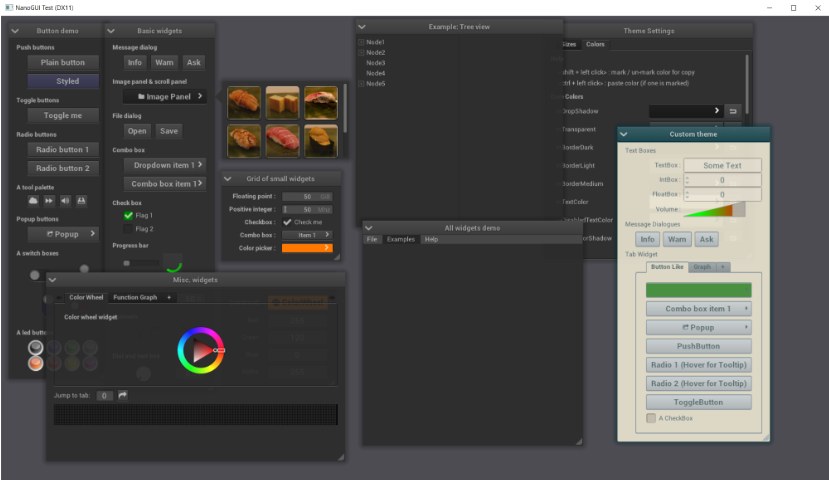
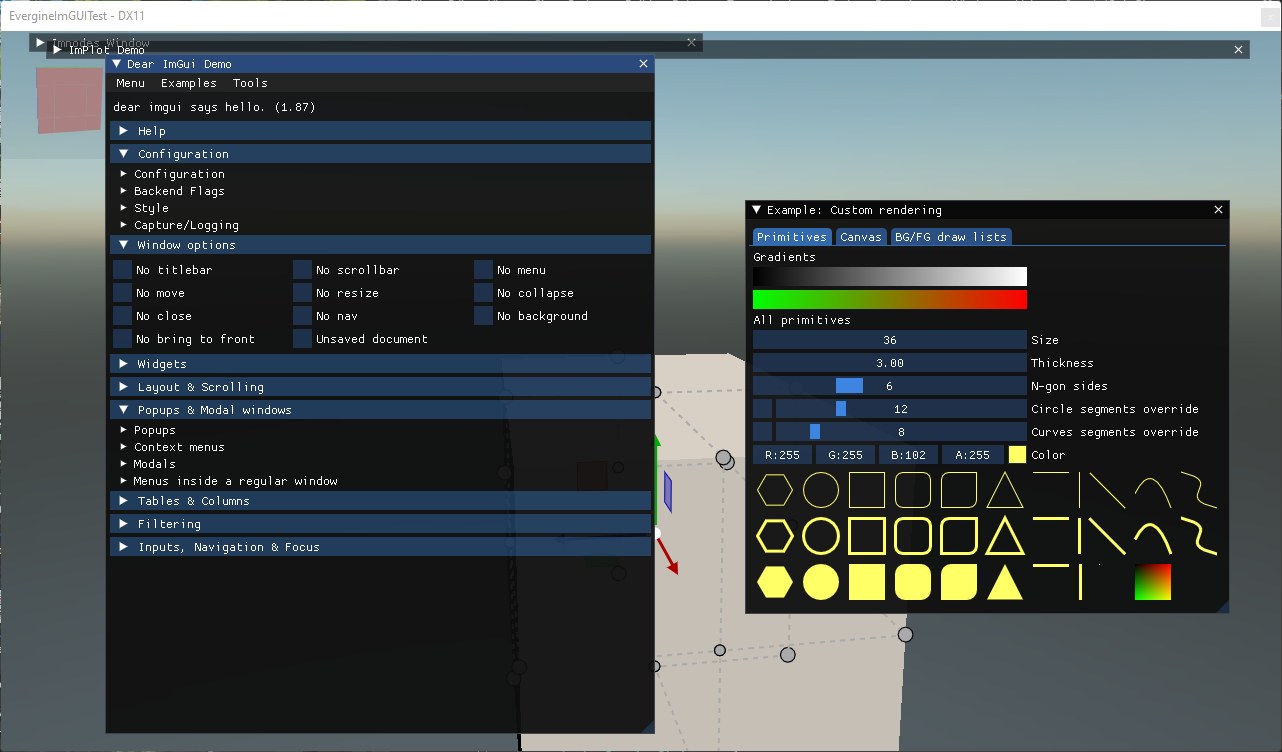
UI is a complex, structured, multi-level, platform-dependent and very underrated part of any engine. But you'd better walk this path at least once, minimally, but well. Don't try to outdo Unity UI, Unreal Slate or HTML. Make a couple of controls: a button, text, maybe a checkbox — and have them not crash.

Architecture
Reflection
C++ Reflection Parser
https://github.com/getml/reflect-cpp
https://github.com/rttrorg/rttrStatic reflection for enums (to string, from string, iteration)
https://github.com/Neargye/magic_enumSmall protobuf implementation in C
https://github.com/protocolbuffers/upbProtocol Buffers - data interchange format
https://github.com/protocolbuffers/protobuf
https://github.com/nanopb/nanopbFast C++11 serialization library
https://github.com/USCiLab/cerealBoost.org serialization module
https://github.com/boostorg/serialization
Basic solutions
bgfx, imgui, glfw, glm
https://github.com/JoshuaBrookover/biggphysically based renderer with a fully featured editor
https://github.com/Trylz/NebulaRenderAether3D Game Engine
https://github.com/bioglaze/aether3dComprehensive set of C++ open source libraries for realtime rendering
https://github.com/WolfEngine/Wolf.EngineImproved version of the X-Ray engine
https://github.com/OpenXRay/xray-16Pure C Game Engine
https://github.com/orangeduck/CorangeCommunity-developed cross platform toolkit
https://github.com/openframeworks/openFrameworksOpen source clone of the Age of Empires II engine
https://github.com/SFTtech/openageCross-platform GPU-oriented game framework
https://github.com/i42output/neoGFX
By a certain point we already have everything separately: graphics, sound, assets, physics, UI, maybe even AI and scripts. But one important thing is still left aside: how do you connect all of this into something that works? There are several working approaches. This topic was covered in more detail in the previous article, so for now I'll just summarize.
No architecture is also architecture
Many indie developers, tired of the complexities of modern frameworks, turn to the simple library approach in development. Its essence lies in creating separate, independent subsystems, each responsible for specific functionality. You create a gfx subsystem for drawing graphics, audio for playing sounds, assets for loading data from disk and input for handling user input. Each subsystem functions in isolation, having no idea about the other parts of the program. You as the developer decide which functions to call and in what order to do it. The whole process is under your direct control. By the way, this approach was popular in the late nineties — early 2000s.
This method has a number of advantages: it's simple to implement, has transparency of operation and is great for small projects. But success heavily depends on the developer's personal discipline; there are no automatic scene managers or other helper structures. Over time it becomes hard to keep the whole scheme of calls and their cause-and-effect relationships in your head.
But at first everything works easily and beautifully, and for many that's enough. Later you may of course run into bugs like the UI not being notified about asset updates, or background music not starting after loading a new level. Solving these problems is the inevitable price for the absence of connections between the various parts of the program. And these connections are, in essence, the application's architecture, the very thing we were initially trying to get away from.
GodObject is also architecture
Big game engines like Unity, Unreal, Godot, CryEngine, Dagor and others often choose an approach based on a single base class. Usually it's a class named Object, Entity, GameObject, Actor or similar, which becomes the ancestor of all game entities.
Such a base class usually contains virtual methods for the main game functions.
class GameObject {
public:
    virtual void update(float dt);
    virtual void render();
    virtual void onEvent(const Event&);
};
All game elements you create — UI buttons, enemies, NPCs — inherit from this single class. Each of these elements automatically gets the ability to update in the game loop, draw on the screen and react to various events. Convenient? Very. Out of the box it provides a uniform interface for all game objects. The centralized structure makes it easy to manage game entities and lets you implement a global object manager.
The main problem is the excessive use of inheritance — all classes descend from one parent, which contradicts the "composition over inheritance" principle. Difficulties arise when you need to implement multiple behaviors for objects — the system becomes fragile and hard to extend.
After a couple of months your GameObject turns into a giant dumpster with 300 lines of virtual methods. Attempts to fix this through components only make it worse. In the end you start to think...
ECS — trendy! But...
An architectural model that has gained great popularity in recent years among indie developers and enthusiasts. The core idea is the radical separation of data and logic inside the game system — everything is built around three key concepts. The Entity is just an identifier containing no logic or data on its own. The Component is a container for a certain type of data, such as an object's position, health pool or sound parameters. The System is a functional block that processes components according to certain rules.
Separately they won't work, but together they let you eliminate the traditional object hierarchy, replacing it with batch processing of data. For example, the physics system can simultaneously access all Transform and Velocity components to update the coordinates of all moving objects in one operation.
Among the advantages we get high performance thanks to efficient use of the CPU cache, a clear separation of responsibilities between different parts of the system, and good scalability.
Among the downsides — we plunge fully into using a complex system that often requires writing a significant amount of boilerplate code. Without specialized editors ECS code is practically unreadable, and without visual debuggers it's also impossible to debug.
For small-scale projects this will be like firing a tank at flies. Attempts to mass-sell this to indie developers have been stalling for the sixth year now, both in Unity and in Unreal.
Or maybe just leave everything as it is?
Yes and no. Architecture isn't a goal, it's a tool. If you're making a hobby project over the weekend — there's no need to build the perfect framework, because you'll end up with a framework, and once you start writing a framework, game development fades into the background. But it's also important that architecture is like a game's skeleton. Nobody sees it, but if it's crooked, everything will ache, bend and break at every sneeze. And when it gets really inconvenient — don't be afraid to throw it all away and start over. Don't be afraid to throw away what's broken, everyone does it (the rule of three systems).
Besides, GEA is still relevant and nothing better has been invented yet; if you suddenly get stuck, reread the corresponding chapter in this book.
Tools
Speaking of tools, the helper instruments for working with the engine — as you might have already guessed — not every engine or game needs them. As tools, for example, simple Python scripts can be used.
Most engines provide full-fledged visual editors out of the box, which look like a hybrid of an IDE (development environment) and Blender, with the ability to place objects in the scene, edit materials and shaders, set up physics and interactions, preview animations and the interface, and test everything in real time.
But creating a full-fledged editor is a task comparable in complexity to developing the engine itself. For a small engine, building a Unity-like editor isn't needed and isn't worth it — it would be inefficient and eat up a ton of time. Nevertheless, you shouldn't neglect simple tools that take a couple of evenings to write but significantly make life easier:
A level converter: often a custom format (usually binary) is the best choice for a small game; your own format lets you manage performance. You can write a utility that takes data from Blender or Tiled, converts it into the needed format on the fly, and the engine picks it up and shows the result.
Resource validation: assets will load crookedly or with errors, this happens all the time. It's worth spending some time on a validator that can run through resources and check whether everything is in place (e.g. whether there are any missing textures, shaders or models). Saves a lot of time during testing.
A texture converter: you almost always have to re-encode images into a GPU format (DXT, ASTC or ETC), or build texture atlases.
There are many examples of mini-tools: an asset importer, a dependency checker, an asset inspector, an in-game console, replays and so on.
It's important to remember: time spent on a tool should save you more time in the future. Don't create a visual editor for the sake of the editor itself. But if you have to manually edit 200 lines of JSON every time and it's inconvenient — a simple tool or script will save a ton of time.
Conclusion
Here we discussed all sorts of interesting features of game (game engine) development — containers, strings, allocators, architecture and so on. And I hope that after all of this the thought "should I make my own engine" doesn't seem too suicidal. Yes, but let's not forget the obvious: 90% of games don't need any of this.
To start understanding how games are built you don't need an Unreal-level engine. So as not to become yet another Unreal "kinda" C++ programmer who can't tell an array from a vector — you have to make your first (or fifth) game without an engine, make a primitive version that opens a window, draws a couple of sprites and packs the project into a zip. Let it be a game-engine. Simple, crappy, but your own. And, more importantly, made with an understanding of the tools used. Without Unity, without Godot, without other convenient crutches. Let it be crooked and slow — that doesn't matter.
But it will let you tinker with architecture, design patterns and figure out resource optimization. This path will take time, but in the end you'll get not just a game, but an understanding of the "inner kitchen". The importance of such an approach is hard to overestimate for your future career. This is where professional growth is laid down and begins. Real growth, without the wrappers. A person who came into development knowing Unreal will only be able to work in it; a person who knows how it's built from the inside can do Unreal, and Unity, and Godot.
Of course, this isn't the only option: if Unreal Engine, Godot or other ready-made solutions seem more convenient to you — why not? It all depends on ambition, patience and willingness to dig deeper. But even if you eventually settle on someone else's engine, the experience of building your own will become a powerful boost for professional growth, teaching you to see, behind the technical essence, the magic of games.
The choice — as always — is yours.

One more thing
And I'm also still looking for the very best studio. The big M is too big, and too clumsy when it comes to decisions. If anyone's interested, there's a LinkedIn link in the profile.
P.S.
This is the last article of the cycle with theory and descriptions of interesting cases. But as a bonus there will be one more with all sorts of examples of perf drops in real cases from game projects (with names given where there was permission), that one will be without theory — just cases of freezes and how they were fixed. Stay tuned!
← All articles