
"String interning," sometimes called a "string pool," is an optimization in which only one copy of a string is stored, no matter how many times the program references it. Among the other string optimizations (SWAR, SIMD strings, immutable strings, StrHash, Rope string and a few others), some of which I described here, it's considered one of the most useful optimizations in game engines. There are, admittedly, some small downsides to this approach, but the memory savings and the speed — with properly prepared resources and proper usage — more than cover for them.
You've 100% written the same string several times in a single program at some point. For example: pcstr color = "black"; And later in the code you had to write: strcmp(color, "black"); As you can see, the string literal "black" appears several times. Does that mean the program contains two copies of the string "black"? More to the point, does it mean two copies of this string are loaded into RAM? The answer to both questions is — it depends on the compiler and the vendor. Thanks to certain optimizations in clang (Sony) and GCC, each string literal is stored only once in the program and, consequently, only one copy is loaded into RAM, so various tricks sometimes become possible.
This is part of the "Game++" series:
- Game++. String interning <=== You are here
- Game++. Cooking vectors
- Game++. Dancing with allocators
- Game++. Juggling STL algorithms
- Game++. run, thread, run...
- Game++. Building arcs
- Game++. Unpacking containers
- Game++. Heap? Less
- Game++. Work hard
- Game++. Patching patterns
- Game++. while (!game(over))
- Game++. Bonus. Performance traps
Like this one (https://onlinegdb.com/ahHo6hWn7):
const char* color = "black";

int main()
{
    const char *color2 = "black";
    printf("%p - %p, %d", color, color2, color == color2);

    return 0;
}

>>>>
0x603cc2b7d004 - 0x603cc2b7d004, 1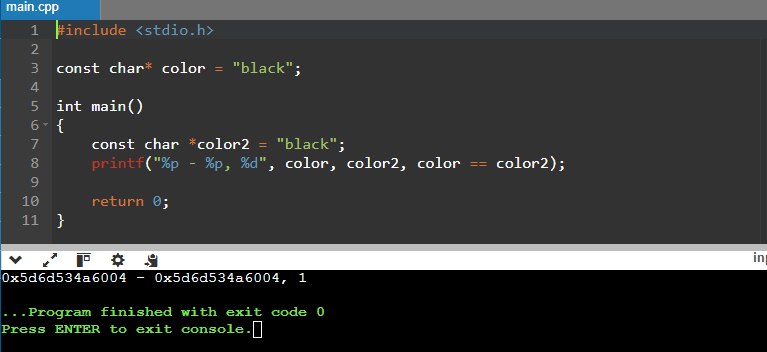
But on Xbox this trick won't work:
00007FF6E0C36320 - 00007FF6E0C36328, 0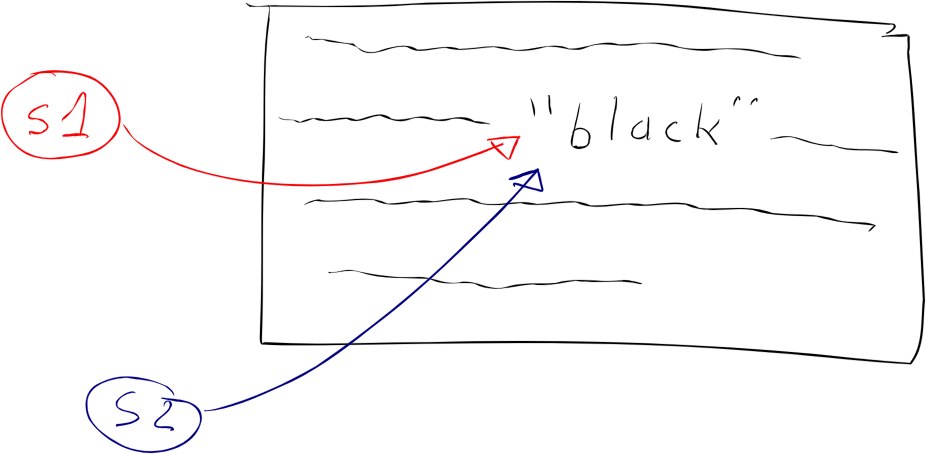
Is the compiler to blame?
Not really. The standard says nothing at all about string interning, so this is effectively a compiler extension that may deduplicate strings — or may not, as you've gathered. And it works only for strings whose values are known at compile time, which means that if the code assembles identical strings at runtime, two copies will be created. In other languages such as C# or Java, string interning happens at runtime, because the .NET Runtime or the Java VM implement this optimization out of the box, as they say. In C++ we have no runtime that could perform this optimization, so it happens only at compile time — but we do have a game engine and dedicated programmers who can do it.
Oh, enough with this black magic
If for some reason you suddenly want to disable this optimization and work MS-style in clang — there's the -fno-merge-constants flag. That same optimization is responsible for deduplicating floating-point numeric constants.
Unfortunately, this optimization is very fragile: there are many ways to break it. You saw that it works fine with const char* — and even then not everywhere:
// Number of copies: 1 in rodata, 1 in RAM
const char* s1 = "black";
const char* s2 = "black";
But if we change the type to char[], the program creates a copy of the literal when the variables are created:
// Number of copies: 1 in rodata, 3 in RAM
const char s1[] = "black";
const char s2[] = "black";
Likewise, if we change the type to string, the constructor creates a copy of the string:
// Number of copies: 1 in rodata, who knows how many in RAM if you put this in a header
const string s1 = "black";
const string s2 = "black";
Comparing strings
Now that you've seen some of the quirks of working with such strings on different platforms, and you also know how to break this optimization, let's look at comparing strings with the == operator. Everyone knows, right, that using the == operator for pointer types — including literals — compares the address, not the contents? Two identical string literals may have the same address, when the compiler managed to merge them, or different addresses, when it didn't.
const char* color = "black";
if (color == "black") { // true, because string interning works
  // ...
}
It's magic — but it works on the PlayStation. All good, but bad, because it stops working as soon as one of the strings doesn't get the optimization.
const char color[] = "black";
if (color == "black") { // false, because color holds a copy
  // ...
}
Maybe to some this seems like a truism — why you absolutely must not use the == operator to compare char* strings? But this stuff is, damn it, all over the place: over the past year I caught 6 (six! in 2024, 4 of them on a Friday, 1 on Friday the 13th, two from one and the same person) cases where literals were compared via pointers and led to all sorts of bugs, and about as many attempts were caught at code review. It seems some people forgot you're supposed to use the strcmp() function, which is part of the standard library and compares characters one by one, returning 0 if the strings match (it also returns -1 or +1 depending on lexicographic order, but that doesn't matter here).
const char color[] = "black";
if (strcmp(color, "black") == 0) { // true, because each character is compared
  // ...
}
Readability has of course gone down, it's error-prone and you have to remember the rules of working with strcmp, but it's our legacy from plain C and everyone more or less understands how to live with it. And perf, of course, suffers, especially on syntactically similar data.
Not quite strings
Any idea how memory fragmentation grows when you use string data? From past experience with ordinary string and its analogues in the Unity engine — the total size ranged from 3% to 6% of the debug build size; 3% accrued from fragmentation, when a small string was deleted but nothing else would fit into that memory region. The average size of string data (mostly keys) was 14–40 bytes, and these holes were everywhere. You'll agree that 30 to 60 megabytes of "free memory" on a 1-GB iPhone 5S is reason enough to try to optimize it and grab it for yourself — for textures, say.
On top of that, this data isn't needed in release, only for debugging. The string data itself can be safely removed from release builds altogether, leaving only the hashes. At the very least, this protects against — or complicates — hacking the game's resources. Add a linear allocator in a separate memory region and you get the ability to remove string-induced fragmentation from the build for good, once everything's done. And those 6% of test data turn into less than 1% of hashes (4 bytes per hash), and we'll definitely find a use for the freed memory.
xstring color = "black";
xstring color2 = "black"
if (color == color2) { // true, because xstring::operator==() is called
  // ..
}

if (color == "black") { // true, because xstring::operator==() is called
  // ..
}
At your fingertips
Developers came up with various implementations for interning data long ago. When my team integrated this solution into Unity 4, we drew on the available sources on GitHub and solutions from GCC, but under the open-source license terms that code couldn't be used directly, so we wrote our own. I recently saw something similar in the stb library — total déjà vu (https://graemephi.github.io/posts/stb_ds-string-interning/).
There are several areas that use a lot — a great deal — of raw text data, but those strings are known in advance and can be hashed: either at runtime or during the content pipeline. In the engine these are prefabs, scene instances, models and parts of procedural generation. They're usually used as independent instances or as templates that can be augmented with other data or components. There's also:
- Literals hashed in scripts
- Tag names in prefabs and scenes
- String values of properties
As a concept it looks pretty simple: it's a fairly simple lookup table that maps identifiers to strings.
namespace utils {
  struct xstrings { eastl::hash_map< uint32_t, std::string > _interns; };
  namespace strings
  {
    uint32_t Intern( xtrings &strs, const char *str );
    const char* GetString( xstrings &strs, uint32_t id );
    bool LoadFromDisk( xstrings &strs, const char *path );
  }
}
In release, at runtime, the engine or game can load a file with hashes and string values if it's needed for debugging. In debug you can create such strings right at the call site — a bit more expensive, of course, but the code stays readable. When we first started integrating this system into Unity, we had a separate object for generating xstring with various masks; this had to do with how Unity stored string data internally, and it was more efficient to pre-generate the identifiers we needed so they all sat one after another and were processed faster when we needed to walk some array of properties. On top of that, Unity 4 also had an object-local component cache that preloaded a few of the object's next components for more efficient access.
xstring tableId = Engine.SetXString( 'table', 'prop', 0 );This function led to the creation and hashing of strings like table0prop, table1prop up to table15prop. You no longer needed to separately create table15prop, because the engine had already done it. But these are all quirks of a specific engine's design, I don't see a point dwelling on them, and besides almost 10 years have passed — maybe they've invented something entirely new there.
Later, thanks to the simplicity and omnivorousness of this system, I used it with minor variations in other projects and engines. As for a concrete implementation, you can look at it here (github.com/dalerank/Akhenaten/.../xstring.h). I'll briefly describe how the code works — it really is very simple.
struct xstring_value {
    uint32_t crc;       // string checksum
    uint16_t reference; // how many references are left
    uint16_t length;    // string length
    std::string value;  // raw data, std::string for now
                        // but it can be any structure tailored to the project
};

class xstring {
    xstring_value* _p;

protected:
    void _dec() {
        if (0 == _p)
            return;

        _p->reference--;
        if (0 == _p->reference)
            _p = 0;
    }

public:
    xstring_value *_dock(pcstr value);
    void _set(pcstr rhs) {
        xstring_value* v = _dock(rhs);
        if (0 != v) {
            v->reference++;
        }
        _dec();
        _p = v;
    }
  ...
}
The xstring_value struct stores metadata for a string; in this particular implementation std::string was chosen as storage purely for convenience — in the canonical form there was a bump allocator that simply placed the new string at the end of the buffer (you have to remember to use such xstrings wisely), which guaranteed the strings were always alive. The xstring class created a new string (if there wasn't one yet) and remembered the pointer to the place in memory where it was placed, or got a pointer to an existing copy if the hash matched. In principle, those are all the main points needed for it to work — I told you it's all very simple. Below is the code that places a string in the pool; again, std::map was chosen for convenience, and I was simply too lazy to bother writing a bump allocator — it only wins a little on speed but loses a little on memory. But the overall approach wins substantially over standard std::string on creation time, when those go through the system allocator (malloc/new), and on comparison speed.
Uninteresting implementation
std::map<uint32_t, xstring_value*> data;
mutex _m; // spinlock ?

xstring_value *dock(pcstr value) {
    if (nullptr == value) {
        return nullptr;
    }

    std::scoped_lock _(_m);

    // calc len
    const size_t s_len = strlen(value);
    const size_t s_len_with_zero = s_len + 1;
    assert(sizeof(xstring_value) + s_len_with_zero < 4096);

    // setup find structure
    uint16_t length = static_cast(s_len);
    uint32_t crc = crc32(value, uint32_t(s_len));

    // search
    auto it = data.find(crc);

    // it may be the case, string is not found or has "non-exact" match
    if (it == data.end()) {
        xstring_value *new_xstr = new xstring_value;
        new_xstr->reference = 0;
        new_xstr->length = length;
        new_xstr->crc = crc;
        new_xstr->value = value;

        data.insert({crc, new_xstr});
        return new_xstr;
    }

    return it->second;
}

xstring_container *g_xstring = nullptr;

xstring_value *xstring::_dock(pcstr value) {
    if (!g_xstring) { g_xstring = new xstring_container(); }
    return g_xstring->dock(value);
}
How to use it
The classic way to use such strings boils down to generating them from scripts and resources, or declaring string constants in code. If you noticed the xstring class, it has a default comparison operator, and since the class itself is essentially a POD int32_t, all the checks come down to comparing integers. Ten years ago this gave a perf boost to animations of a little under 30%, and overall using such strings together with other optimizations made it possible to run Sims Mobile on the iPhone 4S, when the game was being positioned for the sixth generation, and a little for the fifth — something our overseas colleagues didn't consider possible at all.
struct time_tag {
    float12 time;
    xstring tag;
};

struct events {
    static const xstring aim_walk;
    static const xstring aim_turn;
};

void ai_unit::on_event(const time_tag &tt) {
    if (tt.tag == events().aim_walk) {
        ai_start_walk(tt);
    } else if (tt.tag == events().aim_turn) {
        ai_start_turn(tt);
    }

    ai_unit_base::on_event(tt);
}
A bit more on the topic:
- foonathan/string_id — a C++ library for creating unique identifiers for strings via interning. Maps string literals to unique IDs.
- Understanding string interning — a detailed explanation of string interning, its benefits, and when and how to use it effectively.
- A blog on string interning — the article digs deeper into the concept of string interning, offering both a theoretical rationale and practical use for performance in games.
- libstringintern — a C++ library implementing string interning for more efficient memory management.
- String interning in C++ — the article focuses on string interning in the context of C++. It explains how string interning can reduce memory usage and improve performance.