
Games have always demanded high system performance, and game engines were built with proper support for multithreaded computation in mind, so as to make use of all the computer's resources. But applying good abstractions makes development much harder, and although multithreading opens up very wide possibilities in games, it also adds a fair share of problems. Developing any software with multithreading support is a topic of its own, and plenty has been written about it. Here I decided to show the basic patterns for using a task system — one that will, with high probability, be implemented in any game engine — along with the pros and cons of the various approaches.
Most games "make do" with a single thread; this usually implies having a main thread where all the game tasks run (input handling, world update, rendering, etc.) for each frame. This sequential computation model held for a very long time, and even today it's used in a large number of games, especially mobile ones, using the resources of a single core. There are, of course, tasks that separate out cleanly, like loading textures or sounds, but that's more of an exception, due to how isolated the data for such tasks is. To turn the exception into the rule, game-engine developers train the users of those engines to split the game "loops" into independent "tasks" that can run separately in a "task manager," which in turn can run them on different cores. The benefit here is obvious, of course — parallel execution is the main driver of game performance.
What else can you push onto another thread without much harm to the game?
Games, as soft real-time systems, are designed around interaction with the end device that emerged from Mother Nature's own field trials, whose average response time falls in the 0.1–1 s range. For most players the interaction rate is determined by the frame rate (which isn't quite true, actually), which indicates how many frames (images) are displayed per second. Today the de facto standard assumes 60 frames per second, which gives 1/60 s ≈ 16.667 ms to process each frame. If that time is exceeded, it's better to drop the frame — not in every game, of course. Frequent frame drops degrade gameplay, and to avoid dropping frames too often you have to move heavy computation off the main game-logic thread. An NPC that stalls for a couple of frames is less likely to draw the player's attention than stutters during play or an fps drop.
Movement
The classic task you probably start with when modifying any engine is updating unit positions outside the main logic. Ideally we can carve out several threads, each doing its own task. In the case of movement updates, the main thread will handle rendering (the simple case, more on that later), while a separate thread handles the object-movement logic. If the position update doesn't lag too far behind (by 2–5 frames), players won't even notice that the NPC's current position is "gently" catching up to its target. An example from Unreal: character updates (and movement too) happen on separate threads (worker threads), so if an NPC "stalls" it won't affect fps. But this approach also adds plenty of bugs, making NPCs fly through walls, teleport, twitch out of nowhere, or slide along the ground. Sometimes the cause is different — the animation speed doesn't match the character's movement speed, and the foot IK isn't tuned to compensate.
Physics
CryEngine uses a task-based system for handling physics within a single frame, including collisions. The Havok physics engine parallelizes collision checks to speed up processing, especially in scenes with many objects. This made it possible to do completely insane things even on mid-range PCs.
Game logic (scripts, event handling, etc.)
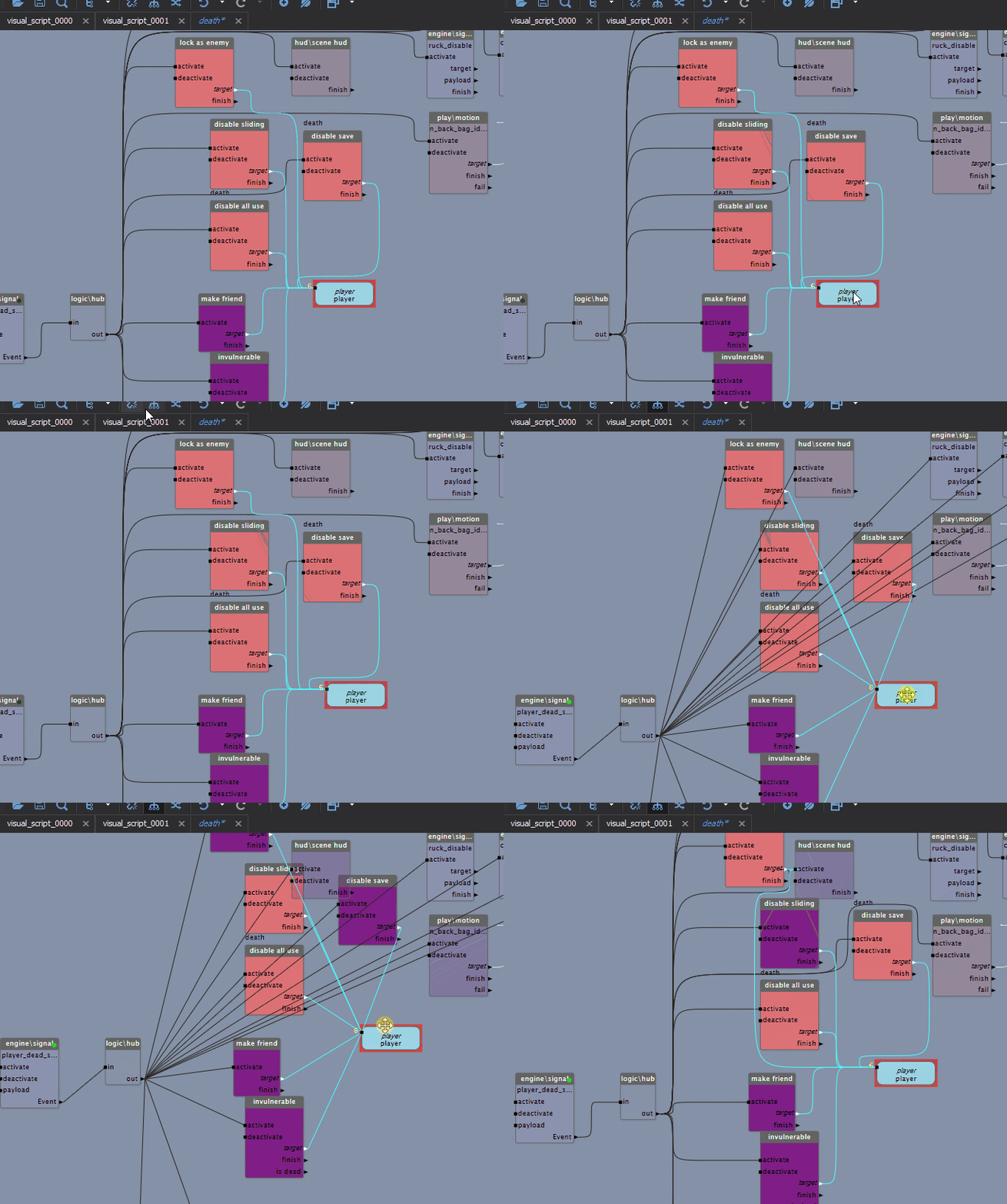
A game engine performs many tasks to generate each frame (drawing graphics, simulating physics). These tasks have ordering constraints that must be respected for them to run correctly, but they're clearly defined. But what do you do with scripts that run arbitrarily? Here the idea of time-task-splitting comes to the rescue, and it maps very well onto BT/VS logic. The idea is simple: there's some visual script made of blocks, there's a time budget for working with it — we run the processing blocks one after another while the time limit holds. The important thing is that the blocks themselves guarantee their execution time; then sequences of blocks can be paused and carried over between frames. Each block in the diagram (this is a VS, a visual script) runs certain logic, and the execution of the next block can be deferred to another frame if the time-slot budget for that script is already exceeded. With this approach the engine balances the load even with a large amount of game logic.
AI / Path-finding
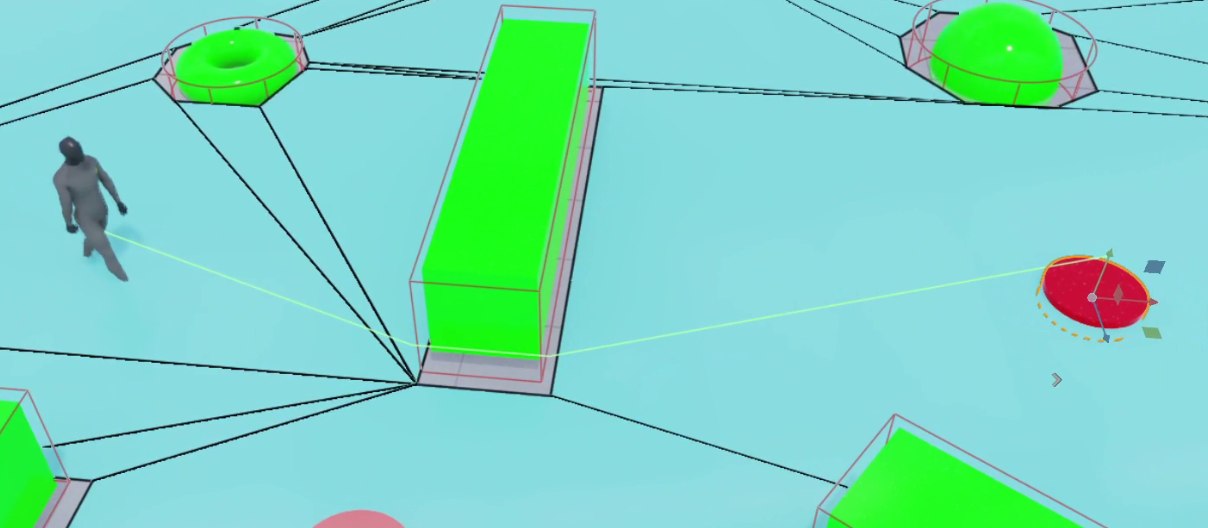
Path-finding algorithms aim to find the shortest path between two given points. Many games include path-finding mechanisms that can range from simple to far more complex. These mechanisms are mostly used to move agents (characters, NPCs, animals or vehicles) and can play a key role in creating the feeling of realistic artificial intelligence. A distinctive feature of most path-finding algorithms in games is that they're data-closed: if you've handed the algorithm enough information to work with, it can run with almost no additional access to external data, which of course makes it an ideal candidate for moving into a task and running on a separate thread. The main downside of path-finding is its long execution time, even over short distances. So you can't run it too often and have to resort to various tricks, simplifications and timeouts.
Animation
The most common task for an in-game animation system is blending — of two or more animations, ideally similar ones. One of the simplest examples is the walk and run animations, which are blended according to the character's speed.
I'm explaining it on my fingers here, but under the hood there's a lot of math, matrices and data dependencies, and yet the animation update also separates out very well from the main logic and gets moved onto a separate thread for processing.
Rendering
An ocean of articles has been written on this topic, and just about every engine tries to move frame rendering onto a separate thread. That's a topic for a separate article, so here I'll just mention it.
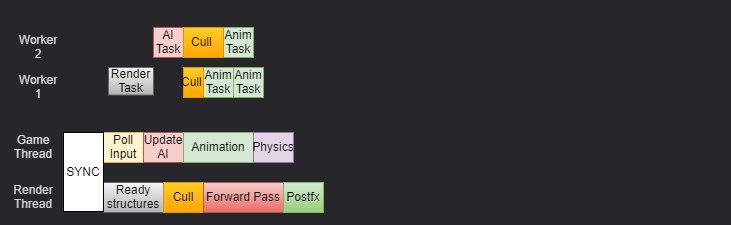
Unreal Engine uses two main threads: the Game Thread and the Render Thread, plus several additional threads for the rest of the tasks. The Game Thread is responsible for running all the game logic that developers write in blueprints or C++. At the end of each frame there's a so-called serial part, where object state is handed off to the render thread, which then runs the drawing logic and gets them onto the screen.
This approach is widespread and used in 90% of engines, because it's convenient to use, but it has serious scalability drawbacks. Unreal games often struggle to make effective use of more than 4 cores, and on consoles performance ends up below what's possible, since out of the Xbox's 8 cores, 2 are almost never loaded beyond 20%. Another problem is that if one thread does more work than the other, the whole simulation slows down, because the game and render threads synchronize every frame, and if one runs slower it lowers the system's overall performance and, as a result, leads to low fps — and then the game-logic throttling mechanism kicks in, starting to drop frames, do longer updates, and discard tasks to keep an acceptable fps. But if a game heavily uses Blueprints or complex AI, the game thread will always be heavily loaded, doing work on a single core, while the rest of the cores stay practically idle.

The Naughty Dog Engine does roughly the same thing, but faster (I'll give links to the materials at the end of the article).
Input / Output
In event-based I/O tasks (event based IO) — like button presses or other input devices — an associated task is launched as a result and the thread moves into a new state. Usually I/O systems are made as simple and fast as possible, so as to read the data, analyze it minimally, and convert it into a local format. Then, already in the local format, it's handed off to another task for processing. For example, when the value of button A changes on a controller (Press/Release), that button's state reaches the game usually as fast as the input thread reads it. But performing the action for the corresponding button is left up to the game logic. Still, to repeat: button states are usually known the instant they're pressed, and the fact that the gun fires with a couple of frames of delay — that's all the game adding its own spin.
In periodic I/O tasks (time based IO), which also include frame rendering and sound output, once the specified time elapses a game timer sends a signal and triggers the periodic task. The stability of a periodic task's launch time matters for the game's smoothness: if, say, the sound-processing time drifts, the game will hiss or click; if the frame time drifts, you get glitches and stutters that players spot very easily. Also in this category is reading all the analog and digital data from the controller — for example, a steering wheel's angle or gyroscope data.
Request-based I/O tasks (force based IO) perform the necessary operations according to the game's logic — an example being controller vibration. Or another example: a forced double poll of the gyroscopes to detect a flip or a sharp turn of the controller in order to trigger special actions in the game.
This little thing, on its early revisions, suffered from gyroscope values getting stuck on a sharp 180° vertical turn. It was hard to reproduce, but users managed it and showed up with bug reports: the value would hang at the boundary +1.f, and the character would start spinning in place.

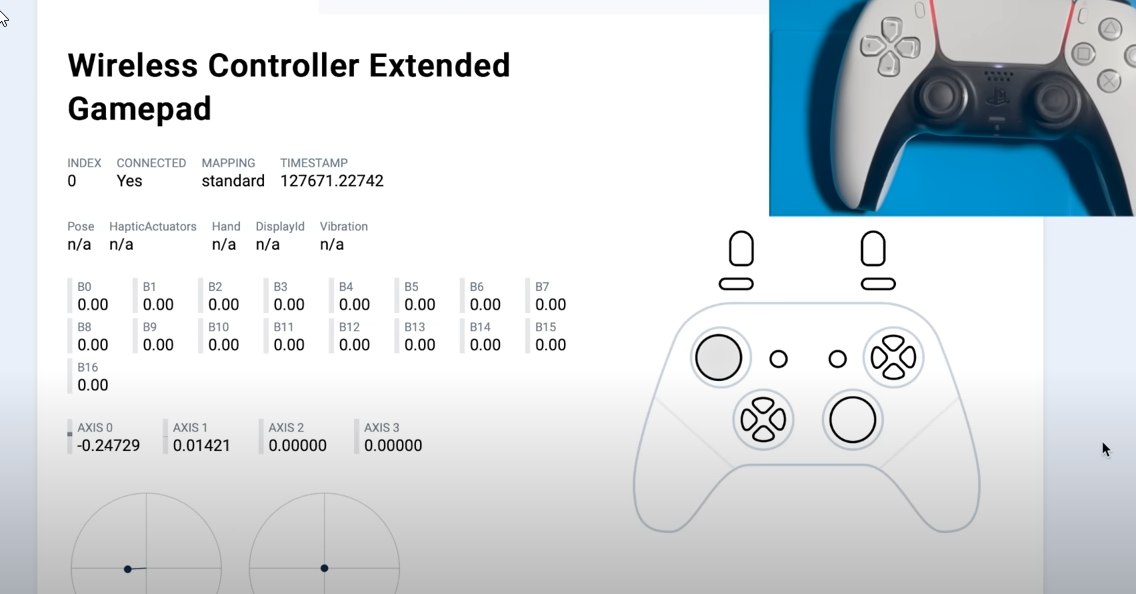
Or it can also be used to check a controller for stick drift: on early-revision PlayStation controllers, stick drift would show up over time in any position, and the drift was only visible when polling in force mode, while a normal read gave an averaged value that "floated" a bit. Sony long refused to acknowledge this problem, but quietly sent studios a recommendation on force-polling the sticks along with a drift-correction algorithm. It surfaced eventually anyway, and the controllers were replaced under warranty. In the screenshot a six-month-old controller shows drift on both sticks, but the left one we read in force mode, while the right is read normally. At the same time, incorrect values sometimes came in from the right one too, which caused character and weapon twitching. The bug, for what it's worth, is from 2018, so it most likely doesn't threaten you anymore.
Interaction with the player
Tasks that depend on the player's state are among the most critical in games. These tasks manage the state of the environment around the player — usually a separate part of the logic, though tied to the overall game state. Most games are player-first (player-centric), i.e. they change their state in response to the player's actions, altering the world and performing the necessary actions depending on the events processed. This is a very broad notion, under which most of the logic a game runs fits to some degree. A clear example of such a system is the task of interacting with the player through the user interface and receiving player input through that interface. No special performance is needed here, but developers try to move UI handling into a separate system that spins on its own thread, to reduce the main logic's dependence on it. Response speed from the user doesn't matter here at all, and from my observations smoothness and visual confirmation of "work" matter more than task execution time. That is, it's fine for the UI to "kind of lag" when showing some data, but if that's accompanied by nice, proper animations, such a UI is perceived better than a fast one with no animations and no transitions between "scenes/widgets."
Grouping / task managers
When there are too many tasks in the system, managing them gets hard. In that case it makes sense to classify tasks by their characteristics.
By temporal classification (temporal groups), inputs (for example, network communication, telemetry work) that must be read in identical or similar periods can be combined and read within a single task. If various numeric data are read periodically, reading several inputs that would otherwise each get their own task can be done in one task. Likewise, a single task can be used with a selection mechanism to read messages from several different UDP ports — telemetry tasks.
By sequential classification (chain sequence), tasks that run one after another can always be merged into one task and processed in a big batch, which lowers the total run time. For example, when updating health or ammo counts, which can change more than once per frame, it's more efficient — instead of processing separate tasks — to push them into a queue or buffer and process them at the end of the frame or on some trigger. Processing tasks in groups leads to better data locality and lower execution time.
By call classification (parent sequence), optional tasks can/should be executed right while the parent task that invoked them is running.
Interaction between tasks
After a task reads data from an external system, it may need to pass that data to another task for processing. The simplest approach in that situation is to copy the data into a shared region and give other tasks access to it. Here we either use the OS's synchronization facilities and mutexes, or write our own primitives like spinlocks (if you're curious to read about the adventures of spinlocks, that's here). Despite their simplicity and wide use, mutexes are very slow, and of course we don't like slow.
For a broad range of tasks in game engines, the most preferable method is passing data through message queues. This structure can be used if the SDK/OS in use supports inter-task message passing. Or you can always build a similar mechanism using queues (a priority queue), in which case a mutex is used only to protect the tail of the queue, or some function responsible for adding messages. Since the whole mechanism of such queues turns out simple, the risk of blocking is almost nil. And if you add a contract to prepare and process messages outside the queue, then only adding or removing the tail remains.
In this case the task supplying the data puts it into the queue, and the task processing the data pulls items out of the queue one by one. The reason this approach is preferable is that you can build easily manageable systems and avoid synchronization mechanisms like mutexes. BUT... as always, there's some "but." Not everything can be solved with message queues, or the cost of developing, using and maintaining them grows so large that it's easier to go back to locks.
How do you make it all play together?
Most modern game engines give each task a separate block of data from a pool, which you can fill as you see fit. Usually it's a few hundred bytes or kilobytes of memory that the task carries with it, or an index into a data pool. But you can also do the opposite, where a task can run using several threads, and two threads can access the same data without worrying that some of it might be overwritten or processed twice — as is done, for example, for a bullet-tracing system, rough trajectory counting, or some other kinds of specific tasks. In all, you can single out four basic data types used to build a task-based architecture inside a game engine; all the other systems will be either a combination or a variation of these types.
Simple task
A simple task consists of a single block of logic processed by a single thread within the task. Messages received by the task change the active state, and the result can be passed to other tasks. Since the task is single-threaded, the next message can only be dispatched after the current message has been processed.
Multi Threaded Manager
A thread-manager task's job (workers) is to manage some logic (a task, a worker) processed on a separate thread (examples: rendering, sound, texture loading). Messages received by the task are first routed to the appropriate thread, then processed by that thread's logic. Here the next message can be dispatched immediately after the current one is processed, since message processing runs on a separate thread. Examples: resource loading, the save system, animation updates.
Single Thread Manager
A special case of the previous one, but simpler to implement and therefore widely used (examples: the logic thread, the game main thread). Usually it's the main game logic with pinned threads to avoid migrations, plus workers to run tasks.
Multi Task Manager
A task manager is similar to a thread manager. It can be implemented either in one thread or in several; the main difference is that tasks aren't bound to threads and can be preempted, stopped and paused, and data can't be shared between tasks. Messages are the only means of communication and synchronization.
Pros and cons of each approach
| Simple task | Single-thread manager | Multi-thread manager | Multi-task manager | |
|---|---|---|---|---|
| Examples | Old engines up to the early 2000s | Stronghold, AoE2/3, games up to the late 2000s, ID Tech 1-4, UE 1-3 | UE 4-5, Unity, Refractor Engine, most modern engines | CryEngine, Frostbite, REDEngine, Rage, ID Tech 5,6, Naughty Dog Engine, Glacier 2+ |
| Complexity | Simple. You only need to process one task. | Complex. Requires managing creation, deletion and message passing. | Complex. Thread-concurrency problems when sharing data. | Complex. Interaction through messages and callbacks; accessing a running task directly is very costly. |
| Message routing | Simple. Messages are just passed to the current task's handler. | Harder. Messages need to be sent to the appropriate object. All objects use one message queue, so routing overhead is higher. | Complex. Messages must be routed not only between threads but also between tasks. | Complex. A task must hold the data to work with and avoid messages. |
| Heap and stack | One heap and one stack are used. | All objects use one heap and one stack. | All threads use one heap. Each thread has its own stack. | Each task has its own stack and heap. |
| Reliability | Reliable. Heap and stack aren't shared. | Unreliable. A crash in one task crashes the whole thread. Stack or heap corruption affects all tasks. | Medium reliability. A crash in one thread minimally affects the others. Stack corruption affects only that thread. Heap corruption or overflow may affect other tasks. | High reliability. Each task has its own stack and heap. One task's memory shouldn't (in theory) affect other tasks. |
| Means of communication | Messages and memory access. | Messages and memory access. | Messages and memory access. However, memory access must account for concurrency issues. | Messages only. |
| Performance | High. Depends only on the implementation. | High. One thread with one stack is used, giving better locality. | Medium. Thread-switching overhead lowers performance. Locality is worse due to separate stacks. | Low. Task-switching overhead is much higher than thread switching. Locality is the worst: each task uses a separate stack and heap. |
| Scalability | None. The whole execution sits on one thread; performance can't be improved by adding processors. | None. The whole execution sits on one thread; performance can't be improved by adding processors. | Medium. Each task runs on a separate thread; adding processors lets several threads run at once on different processors. Heap contention limits scalability. | High. Tasks have their own threads, stacks and heaps. Resources aren't shared between tasks, so the system scales well as processors are added. |
Links to materials for the article
- Don't Dread Threads — four easy steps to parallelize: data decomposition, task definition, threading (API) and validation.
- Task-based Multithreading — How to Program for 100 Cores — tasks vs. threads, thread pools, priorities, handling dependencies and DX11 deferred contexts.
- GTS — Intel Games Task Scheduler — a task scheduler for engines (project halted).
- Efficient Scaling in Game Engines.
- Evan Todd — Poor Man's Threading Architecture — articles on task-based architecture in games.
- Destiny's Multithreaded Rendering Architecture (Natalya Tatarchuk, GDC 2015).
- Parallelizing the Naughty Dog Engine Using Fibers — the fiber-based job system for The Last of Us Remastered at 60 fps.