
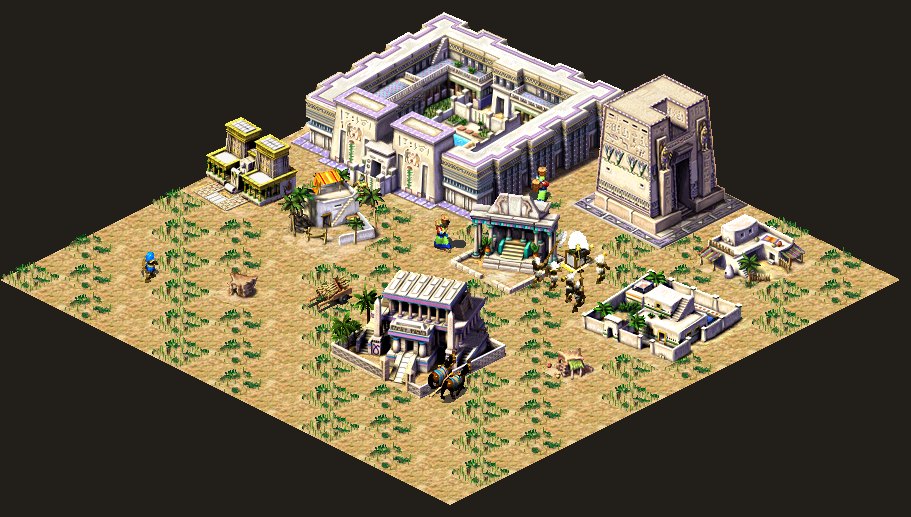
The code that drew units and tiles in late-nineties strategy games ran hundreds of times per frame: hardware blitting was cheap enough, but it still wasn't cheap on memory, and it touched almost every pixel the player saw on screen. That probably mattered less when the resolution could be 640×480 (which, at the very least, is the monitor I first played Pharaoh on), and for code like that the thing that mattered most was no longer architectural elegance but how the data sat in memory. Then again, who better than those pioneers to hold forth on beautiful architecture within one particular 16 megabytes.
Whatever the marketers say, games have always been about the picture first, and a good picture in an ancient Egyptian strategy game means thousands of sprites: houses, citizens, animations in eight directions, temples, twelve enemy armies and monuments. The monuments were even drawn in a separate pass, because they were huge and didn't fit on every screen.
Pharaoh ships with about 302 megabytes of graphics alone, and if you parse the game's ini file you'll find a RAM parameter there, set to 15 by default, which is roughly what an average machine had back then. There was also a separate "low memory" mode for machines with less than 16 megabytes, for those of us with a modest 14 megabytes of RAM (like me), in which the game forced 640×480 and simplified the city simulation loop.
The standard tools of the time were a poor fit for a job that boiled down to keeping everything you don't need right now out of memory, so Impressions solved it back in Caesar with their own graphics compression format, which is easiest to describe as "hacks, tricks and black magic that save RAM".
In this article I'll go through those tricks, with numbers from the actual game files and code from Tutankhamun, my reimplementation of Pharaoh in C. The project started about three years ago and has finally reached the finish line, meaning readable sources, and if you've been reading my articles for a while you probably remember that the very first one was about reversing the Caesar engine. Well then... time to plunder the Pharaohs' tombs too.
Data formats are tools too
Blitting is a borrowing from the name of the ddraw function that instantly copies a texture preloaded on the video card into the right spot of the back buffer, the screen buffer for the next frame. Tech.: the operation of moving a raster image from a storage device to an output window on the display. Thanks to 8 street.
Today data formats are unshakable truths carved into code, handed down to us along with the vendor's or the console's SDK, and if you want your model to load quickly through the hardware decoder, kindly file down the protruding parts of your engine... but that's now. Back then data formats were just another layer of tooling, and people invented the format a specific job needed. Nobody tightens a hex nut with a pentagonal wrench, but if you don't know you're allowed to do otherwise, you'll keep trying to cram the game's graphics into BMP simply because BMP/PNG opens in an editor.
What options for storing graphics did a developer have in 1999, and what did each of them cost? You could take a raw bitmap, the most obvious choice, and then every image is a proper rectangle of pixels, width times height times two bytes, or four. You can read it, draw it with a single memcpy, and there's, alas, no magic in it at all... plenty of people did exactly that, and still do.
But an isometric city builder (especially the old 2.5D ones) consists almost entirely of textures that aren't rectangles, like the diamond-shaped ground tile that covers less than half of its 58×30 rectangle, while everything else is transparent corners that you have to dutifully store, since our texture is rectangular after all.
And you'll also have to dutifully read it from disk and dutifully skip all the transparent bits when drawing, and a citizen walking down the road has even more transparent background around the figure. If you add up all the images Pharaoh keeps in memory after startup as plain bitmaps, you get something like 62.6 megabytes. In other words, it doesn't fit at all, and you'd need a supercomputer with 64 MB of RAM, which very few people had.
A 256-colour palette
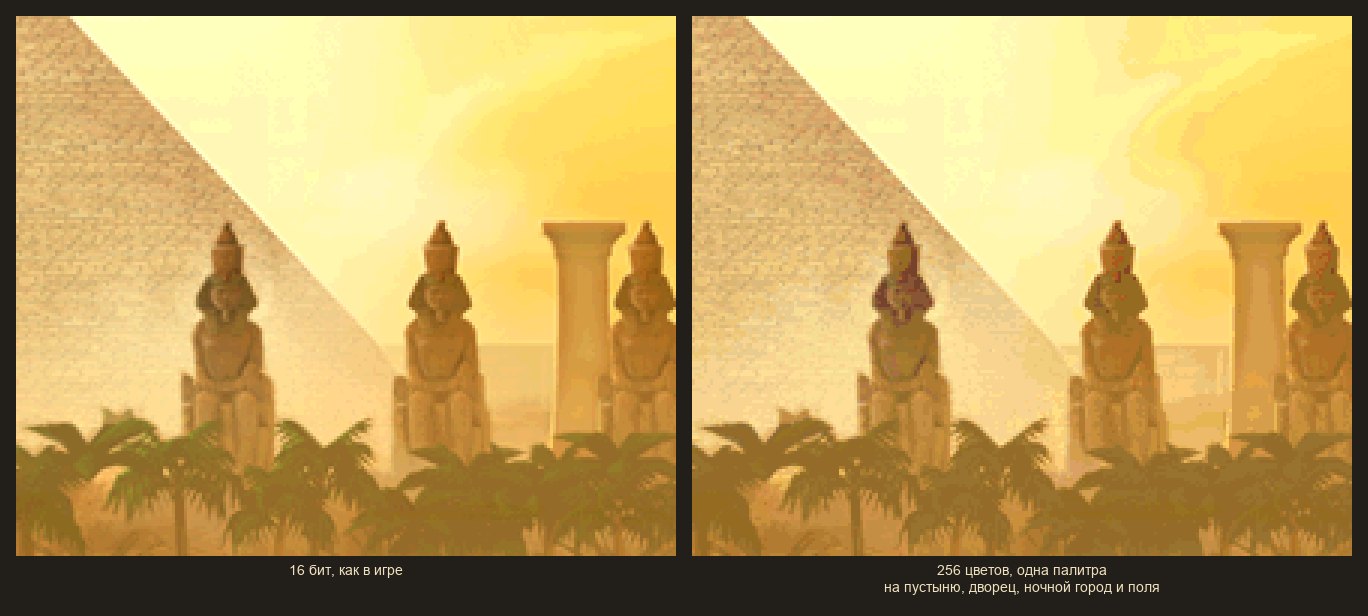
You could hack the colour itself, so that instead of a proper colour a single byte indexes into a 256-colour palette, which immediately cuts memory in half, and good old Caesar II lived exactly like that, as did many games of the era.
But by the end of the nineties video cards handled 16-bit colour just fine and artists wanted smooth gradients of sand and water, while 256 colours for the whole screen meant that the desert, the Nile, the green fields, the citizens' skin and the gold of the temples would all share a single palette. And multiple palettes, SNES-style, nobody in their right mind would do by hand on a PC, because it's expensive, ugly and still not very effective, so Impressions moved to 16 bits and had to save somewhere else. See the gopher? Neither do I, but he's there...
DirectDraw surfaces
The brand-new DirectDraw offered to keep images in "surfaces", ideally right in video memory, and draw them with the hardware blitter, which on paper sounded like free performance. In practice a typical 1999 video card had 4 megabytes of memory if you were lucky, part of which was already taken by the screen and back buffer; surfaces could get "lost" when switching windows and had to be restored; and the hardware blitter could do a colour key but knew nothing about RLE, diamonds, or tinting a font to the right colour. So in the end Pharaoh uses DirectDraw only as a way to present the finished frame and draws all the images itself, on the CPU, which is why the CPU-starved PCs of the day could only manage the game at 640×480 and 20 frames per second.
Archives and compression
You could compress everything with some flavour of LZ and unpack it at load time, which saves disk space (sort of; the game took up less than half a CD anyway), but it won't save any memory, and an unpacked sprite takes exactly as much as an uncompressed one. So compression only makes sense if the image can be drawn straight from its compressed form, without unpacking.
And the last option leans on Windows: allocate as much as you need and let the swap file sort it out. But if the game ran short of physical memory, pages physically moved out to disk and back again when needed... which was, let's say, noticeable to the naked eye, and as soon as a scene needs more than there is, the frame turns into the rustle of a hard drive and the player learns what three frames per second look like.
Jumping ahead, Pharaoh relies on this mechanism too, it just tries hard to make sure the cold data really is cold.
How Pharaoh does it
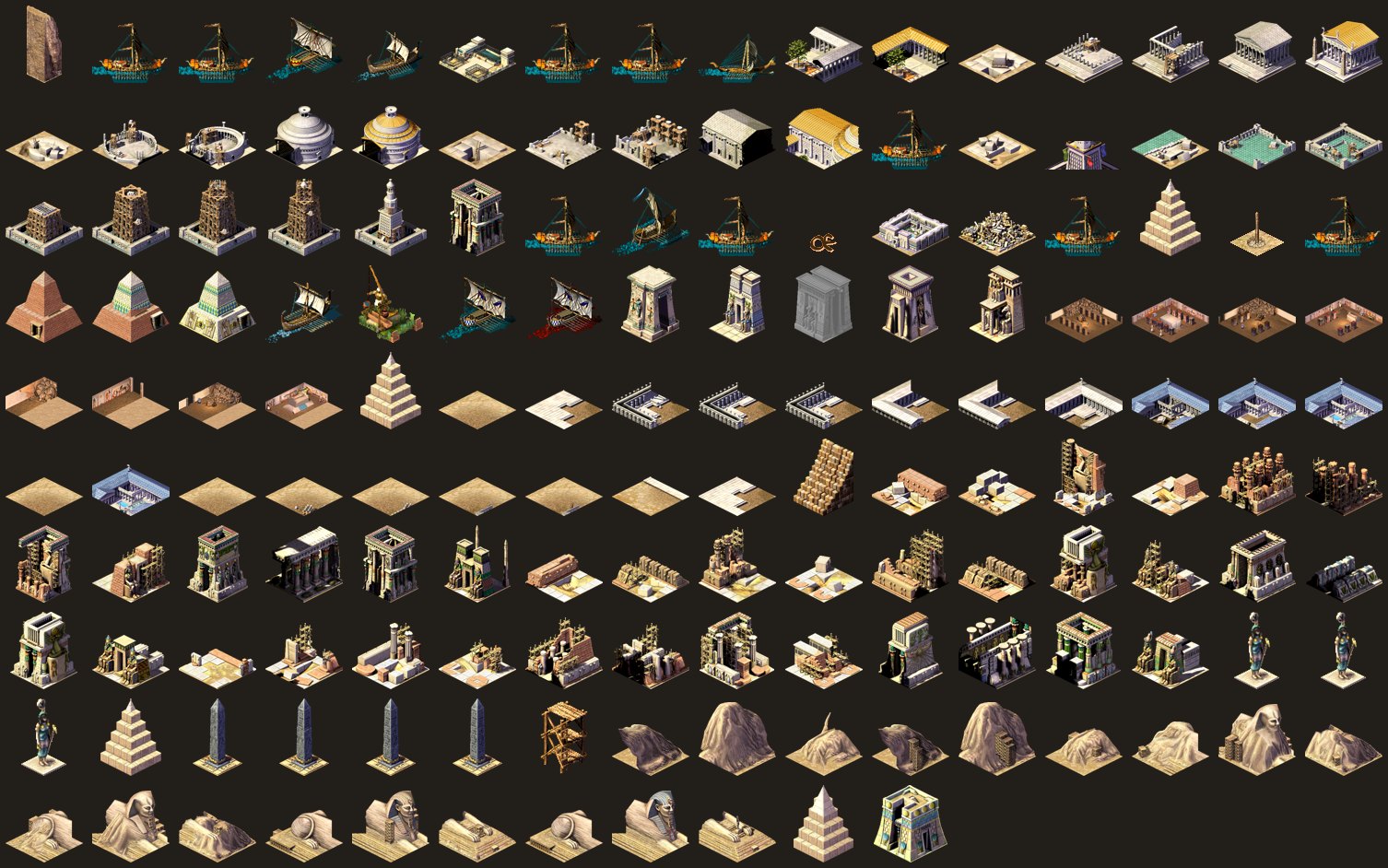
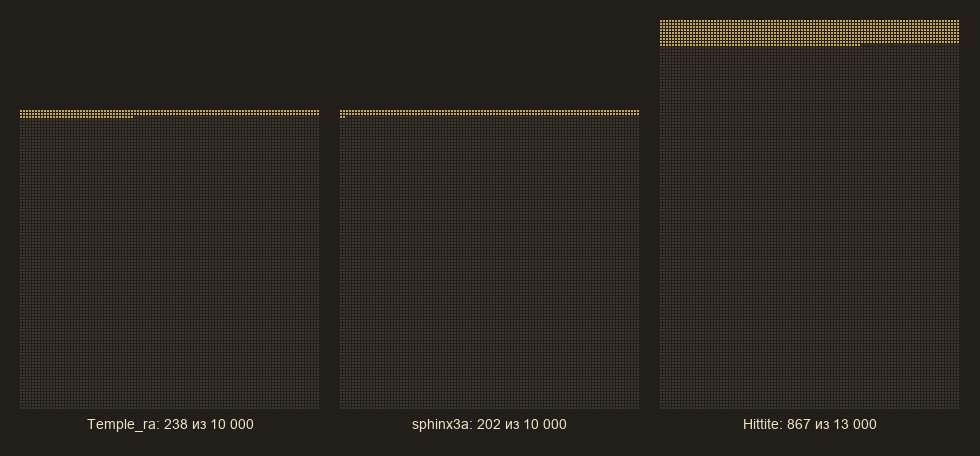
All of the game's graphics live in the Data folder as pairs of files: .sg3 is the index and .555 is the pixels. The build has about two hundred such pairs, 395 files and 302 MB in total, of which 177 megabytes are the pixels themselves and another 125 megabytes are indexes, but the indexes are mostly empty
Every .sg3 starts with a header, a table of 300 groups, the names of the source BMP files the artists assembled the texture pack from, and an array of 64-byte records, one per image. A file always has either 10,000 or 13,000 records, no matter how many images it actually contains, which is why 158 files are 695,080 bytes each, and another 17 files with citizen and enemy sprites are 887,080 bytes each. I suspect this came from the build pipeline or a build farm, although when I talked to Simon Bradbury (lead of the Caesar team and partly of Pharaoh, and of Stronghold too), he never mentioned any build farms: the build was simply put together on request by one of the programmers on his own PC and dropped onto a shared drive.
typedef struct {
    int32_t data;                  // pixel offset in .555
    int32_t data_length;
    int32_t isometric_top_offset;  // where the top of the building starts
    int32_t file_slot;
    int32_t mirror_source_offset;  // where to take the image from if it is mirrored
    int16_t width, height;
    // ... animation, sprite offsets ...
    uint8_t draw_type;             // flat, isometric, single-colour font ...
    uint8_t is_compressed;
    uint8_t is_external;           // pixels are on disk, not in memory
    uint8_t has_isometric_top;
    // ...
    uint8_t is_mirrored;
} image_header;                    // 64 bytes, static_assert in our code
So a hundred-odd megabytes on disk are mostly zeros that never make it into memory: the game reads the .sg3 into a temporary buffer, parses it and frees it right away. Disks in 2000 were already big, but there was no way to fit the whole texture pack into memory, and funnily enough there still isn't: with 8 GB of video memory, levels now weigh 20–30 GB.
On top of that, every texture pack, besides its real texture sprites, starts with the same two hundred images from system.bmp (frames, buttons, arrows), all of it a legacy of Caesar 2, which actually kept its data there. Presumably it was more convenient to keep the format backward compatible. The game's loader knows about this, and for every pack after the first one it skips those two hundred records and starts reading the .555 at offset 39,214 bytes. A small thing, about a megabyte saved across all the packs together, but in 2000 a megabyte was still a megabyte, and you had to fight for kilobytes.
RLE you can draw from
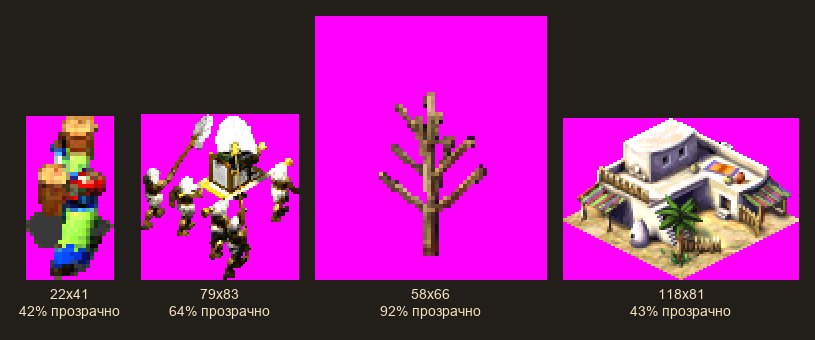
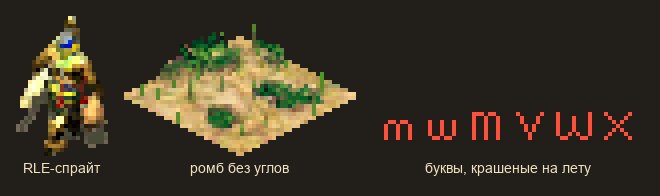
Back to the transparent pixels (citizens, animals, trees, smoke) stored in our sprite. The game encodes those bytes with RLE and marks the start of a transparent run with 0xFF, followed by a number N meaning "skip N transparent pixels", while any other byte N means "N ordinary 16-bit pixels follow".
while (row_left > 0) {
    uint8_t n = *src++;
    if (n == 0xFF) {        // transparent run
        n = *src++;
        dst += n;
    } else {                // opaque run
        memcpy(dst, src, n * 2);
        src += n * 2;
        dst += n;
    }
    row_left -= n;
}
The key thing here isn't even the compression ratio, it's that this format doesn't need unpacking and the blitter can draw straight from it (remember, we're drawing pixel by pixel on the CPU): transparent pixels can be left alone and the pointer simply moved along. So the 13,366 compressed images the game keeps after startup come to 19.85 megabytes of real pixels to draw instead of 34 MB as raw bitmaps, i.e. minus 40%.
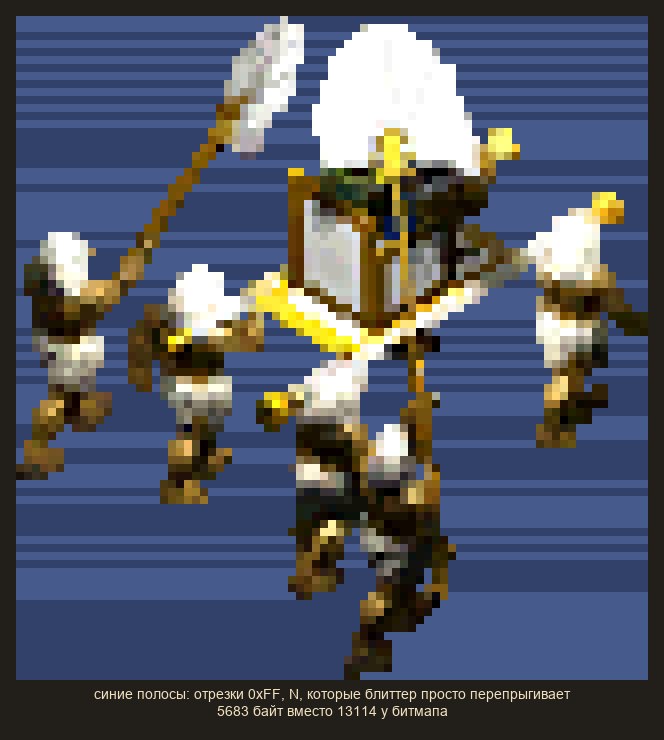
As we all know, everything has a price, and if a sprite is clipped at the top by the edge of the screen, the blitter dutifully scrolls through all the invisible rows to find the first visible one and start drawing. And it gets more interesting from here...
Diamonds without corners
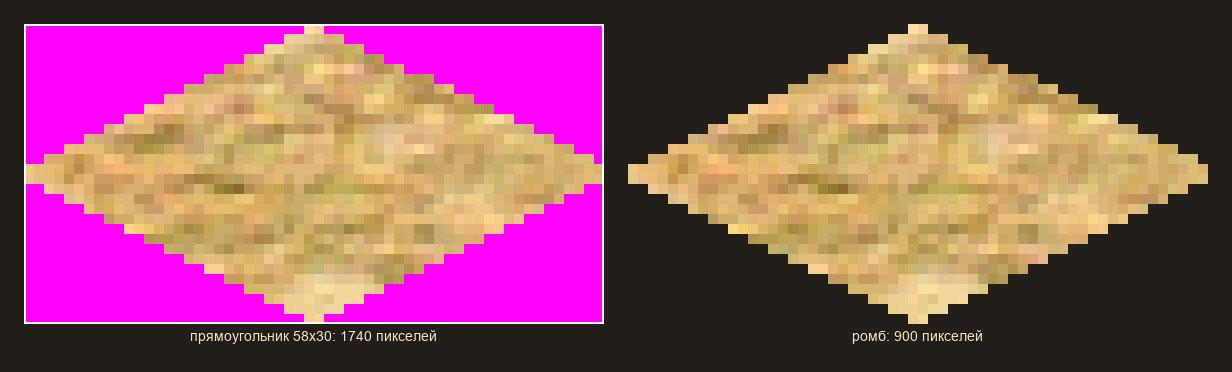
To the player an isometric ground tile looks like a 58×30-pixel diamond, but storing it as a rectangle means storing 1740 pixels, less than half of which are visible. So the game's authors started storing only the diamond itself (rows 2, 6, 10 … 58, 58 … 6, 2 pixels long, back to back), with no empty bytes, which gives 900 pixels and cuts the size by 50%, and since all our map tiles are diamonds, that frees up another half of the memory.
This is also where the breakdown of large N×N buildings comes from: their tiles are stored as N² such diamonds and drawn diagonal by diagonal. It also simplifies drawing, because the diamond blitter needs neither a colour key nor a transparency check; it just knows the length of each row. It has no idea what it's actually drawing, and the whole isometric rendering of a building rests on offset arithmetic. Who said anything about transparency?
The top of the building, separately
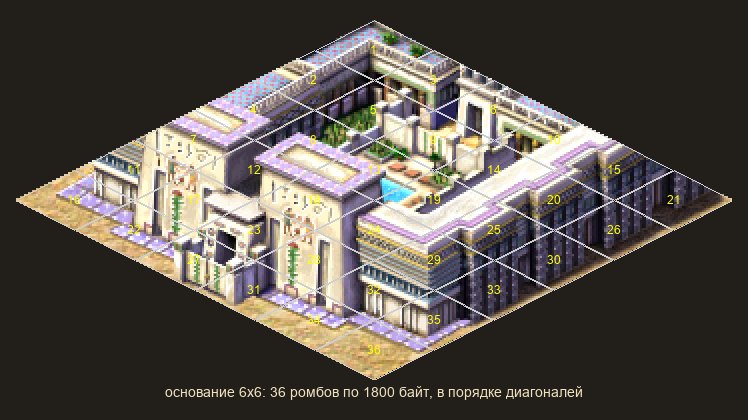
But this way of drawing only works for "flat" tiles, and a proper building is more than its footprint. A temple has columns, a house has a roof, a workshop has an awning, and all of that sticks up above the diamonds, so that part has to be stored separately, right after the diamonds, compressed with the same RLE, and the image header holds an isometric_top_offset saying where it starts.
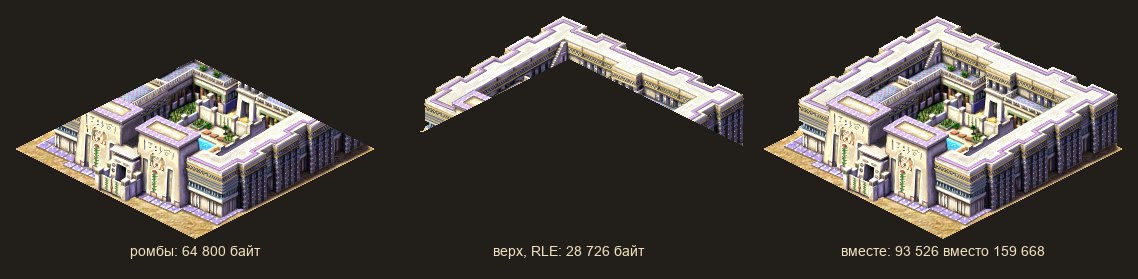
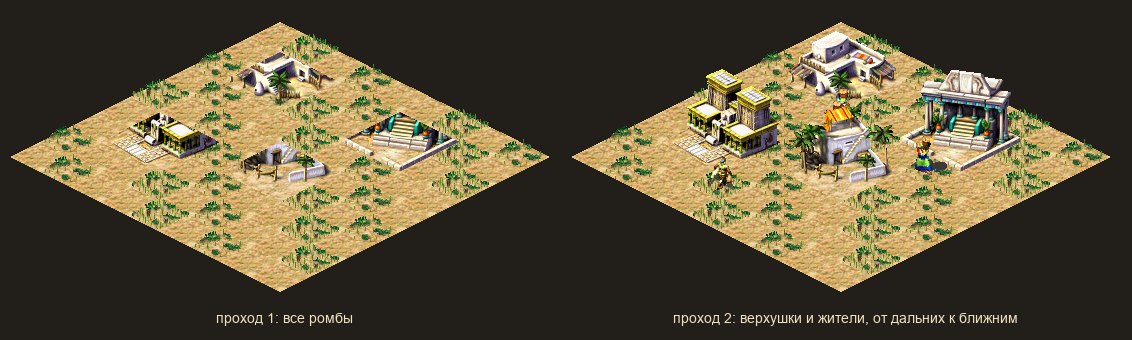
A 6×6-tile building measuring 358×223 pixels now takes 36 diamonds of 1800 bytes each plus 28,726 bytes of top, 93,526 bytes in total instead of 159,668. And this also solves overlap without a z-buffer (not cheap even today, and in the two-thousands a real problem for isometric games). The game first draws all the footprints on screen, then in a second pass, row by row, the building tops, citizens and animations, and the near row is simply drawn after the far one, so everything ends up where it belongs.
Five directions instead of eight
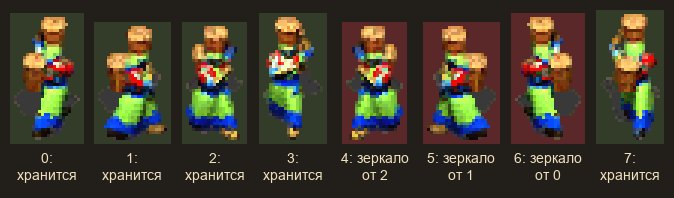
On to the citizens of our virtual city. In Pharaoh they walk in eight directions, and every animation frame needs eight separate textures, but since screens were small, the game's authors resorted to a hack and stored animations for only five directions, while directions 5, 6 and 7 were flagged is_mirrored and pointed to neighbouring records at offsets −2, −4 and −6. The blitter drew them mirrored, which saved roughly another 2.3 megabytes of RAM, so, if you think about it, walking right costs half as much as walking left.
A font that gets coloured as it's drawn

That still leaves the letters... perfectly ordinary letters that also have to be drawn on screen and also take up memory. Letters are ordinary images in the Pharaoh_Fonts pack, 1340 of them in 488 kilobytes, and some of them are of the "single colour" type: a separate RLE mask with no colours of its own, which the blitter fills with whatever colour it's handed. One set of glyphs works for white, red and green text alike, and the shadow under a caption is the same letter drawn once more in black, shifted by a pixel.
Images that aren't in memory
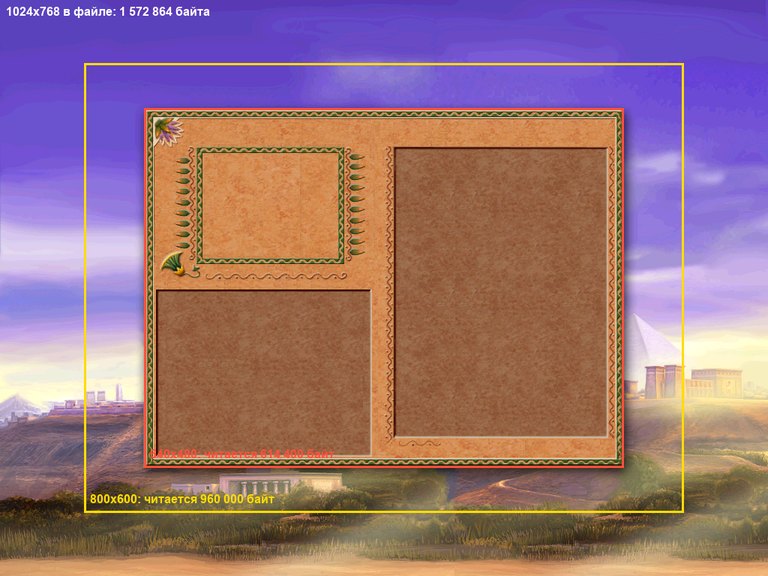
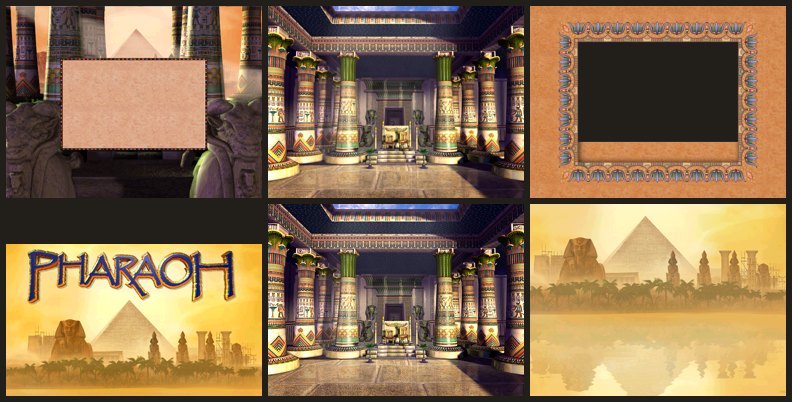
But the biggest win in the game comes from a mechanism the code calls "draw in place": all such textures are moved out of the texture packs into a single one. It's an almost empty file holding two hundred system images worth 39 kilobytes and 482 textures whose pixels live in separate .555 files and are never loaded into memory at all. These are the big textures that take up almost 44 MB (full-screen menu backgrounds, briefing pictures, advisor portraits, tutorial illustrations, panel frames).
And when the game needs to draw one of these images, it opens the file, reads that chunk into a separate screen-sized work buffer, then converts the colour and draws it over the main screen.
seek(fd, offset_of_first_visible_row);
for (row = 0; row < visible_height; row++) {
    read(fd, buffer, visible_width * 2);
    seek(fd, row_skip, SEEK_CUR);   // 1024 * 2 - visible_width * 2
    buffer += visible_width * 2;
}
Slots and placeholders
Almost done. All graphics in memory are laid out across thirty slots, which can address individual texture packs with a fixed range of image numbers, meaning Pharaoh physically couldn't hold more than 16k textures in memory. Image numbers were hard-wired into the code and into save files, so you could change what a slot contained, but you could no longer shift the numbers.
This too is a Caesar 2 legacy that was only abandoned in Zeus, so a loading system was needed in which some slots were permanent (main sprites, common graphics, terrain, fonts, the empire map), while the rest were swapped depending on the situation:
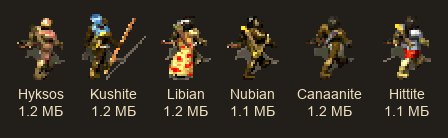
- for example, the enemy slot held only one of the twelve armies, from the Hyksos to the Persians, about 1.2 megabytes each, chosen by the mission scenario;
- or the temple complex slot, one of five gods, loaded when the player places it, which limited the ability to build different complexes on the same map.
- or the monument slots (pyramid, mastaba, Valley of the Kings tombs, Abu Simbel, the Library and Lighthouse of Alexandria, depending on the mission's era).
- The Sphinx, the Lighthouse, the Library and the Mausoleum, where each construction stage is a separate texture pack, loaded as building progresses and replacing the previous one

So the real Abu Simbel weighs 9.4 megabytes, but only the 1.2-megabyte part actually used in the mission gets loaded.
int32_t image_collection_load_file(const char *name, int32_t slot)
{
    if (strcmp(slots[slot].name, name) == 0) {
        return 1;                      // already loaded, nothing to do
    }
    free(slots[slot].pixels);          // free the old pack
    load_sg3_and_555(name, slot);      // the slot's image numbers don't change
    return 1;
}
How games used to be made
Same as now, with tricks, hacks and defaults; only the scale has changed. After startup Pharaoh holds about 39 megabytes of pixels in thirty slots, plus 3.2 megabytes for the header table, plus the screen buffers. That's more than 16 megabytes, and more than 32, but far less than the original 300 megabytes, and the game honestly relied on the Windows swap file. The whole machinery described above existed so that the working set of a single frame (terrain, citizen sprites, the current enemy, the right monument stage) fit into physical memory, while everything else lay quietly on disk without rustling and grinding.
Without all these tricks the same images would have taken about 92.6 megabytes plus another 8.3 for the mirrored directions, not counting the 43.8 megabytes of full-screen backgrounds that are never loaded at all and the monuments that are loaded only in their own missions, and that's roughly what the difference between "fits with swap" and "doesn't fit at all" looked like in 2000.
In lieu of a conclusion
I love digging into old games because they show how you can work within constraints. None of the tricks described here was a breakthrough on its own: RLE has been around since the seventies, and the maths of isometric diamonds dates back to the fifties or even earlier. Mirrored sprites were already a thing on the NES, and loading data on demand is just a developer's common sense.
But together they turned 300 megabytes of graphics into a working set that fit into the memory of a 2000-era computer, and they did it without a single line of assembly, just by changing the data format. As usual, the challenge turned out not to be drawing faster, but simply having the right images in memory, in the right form, at the right moment.
P.S. And so ends the story of almost three years of restoring the source code of the original Pharaoh; feel free to take a look at what came of it. Binary- and spiritually compatible with the game from 2000. Welcome to the IT excavations: https://github.com/dalerank/tutankhamun
P.P.S. The project fell victim to Claude in its final stages (roughly the last two months), when it came time to write documentation, which I'm seriously allergic to: digging the code apart is no problem for me, but afterwards writing down what's going on in there and making it readable... not so much... that's always been my weak spot. All in all, though, he turned out to be an excellent assistant in matters archaeological, surprisingly....
All articles