
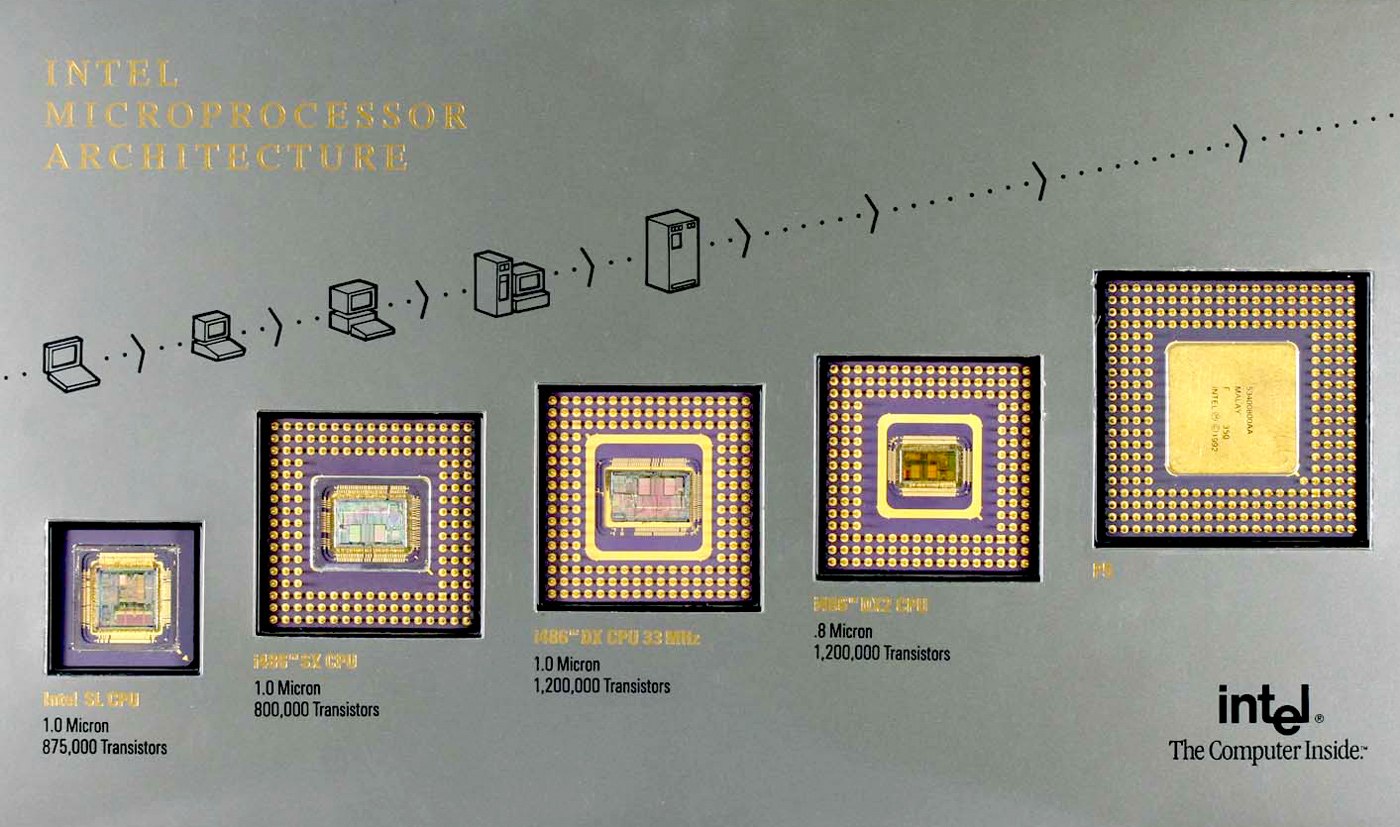
At the end of a technical interview, if the candidate has answered the questions and handled the tasks, we leave some time for open questions they can ask the team or one of the interviewers. I've carried this practice from company to company, and it has always helped defuse the mood or draw a person into a conversation if they were tense during the talk. The questions can be anything except personal ones or those under NDA. Usually candidates ask technical questions about the stack and the pipelines; sometimes they try tricky questions, especially about C++, to test us. Sometimes we can't answer all of them either. Google-style questions — for example, "why are pills round?" — come up too, but recently in one of the interviews a question was raised that everyone seemed to know the answer to, yet no one could give it right away. The question went like this: "Which general-purpose technologies and solutions have appeared in CPUs since the days of the 486 that we use all the time?"
The question is genuinely interesting — what new things have appeared that we use every day? What can modern CPUs do that processors couldn't do a year or two ago, five or ten years ago, forty years ago? We just use billions of transistors without even knowing how they work. Digging around in Wikipedia, on Agner Fog's site and in Intel's documentation, I put together a list of what has appeared and is used in modern CPUs. Everything listed below applies mostly to x86 and consoles unless stated otherwise. Since consoles after the third PlayStation generation are effectively PCs with minimal differences, the rest of the discussion will mostly be about PCs. History tends to repeat itself, and a lot of what we have now was introduced more than once, just under different names.
Miscellaneous
To start with, modern CPUs have wider registers and can address more memory. In the 80s 8-bit processors were used, but today almost certainly every PC and console runs on a 64-bit processor. I won't dwell on this in detail, assuming the reader is at least familiar with programming or an adjacent field.
Other things we use in everyday life but that were introduced into x86 back in the early 80s are paging and virtual memory, computation pipelines, and floating-point support via coprocessors.
Caches
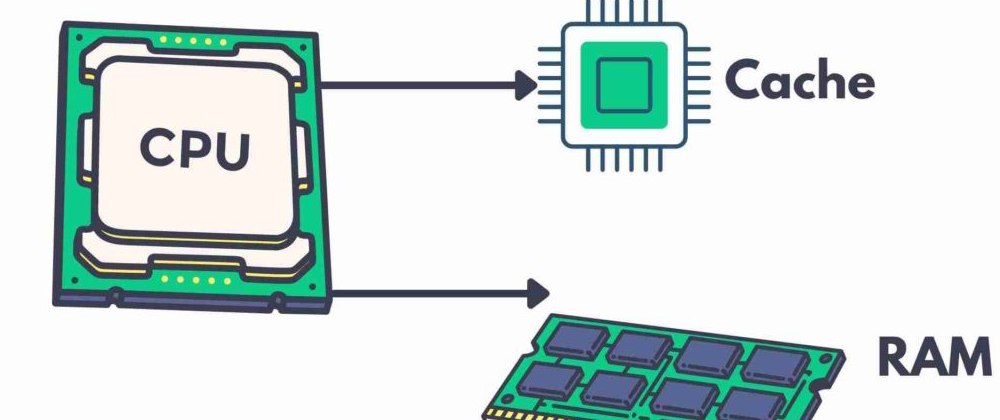
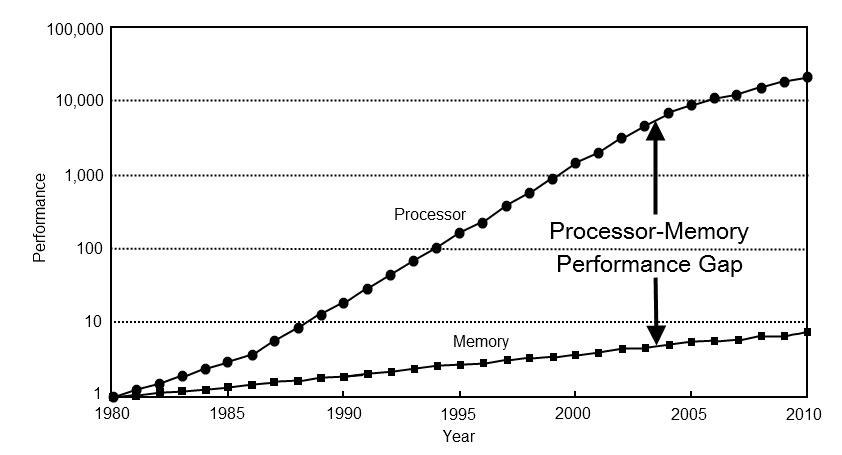
One of the most significant technical solutions for everyday programming was the appearance of caches in processors. For example, on the 286 a memory access took only a few cycles, whereas on the Pentium 3/4 a memory access already required more than 400 cycles. Even though processors became significantly faster, memory didn't develop as quickly.
The solution to the slow-memory problem was caches and prefetching data in large blocks from main memory. Caching lets you quickly access frequently used data, and prefetch loads data into the cache when the access pattern is predictable.
A few cycles versus 400+ cycles looks frightening — effectively a slowdown of more than 100×. But if you write the simplest loop that processes a large block of data, the CPU will prefetch the needed data ahead of time, letting you process data at around 22 GB/s on my 3 GHz Intel. Processing two pieces of data per cycle at ~3 GHz, in theory you could get 24 GB/s, so 22 GB/s is a decent result. We lose about 5% of performance when loading data from main memory, not orders of magnitude more.
And that's not all: with known access patterns — for example, when working with arrays and data blocks that fit nicely into the CPU cache and are easily detected by the prediction unit — you can reach close to maximum processing speed. Here it's worth mentioning Ulrich Drepper's well-known paper "What Every Programmer Should Know About Memory".
TLB (Translation Lookaside Buffer)
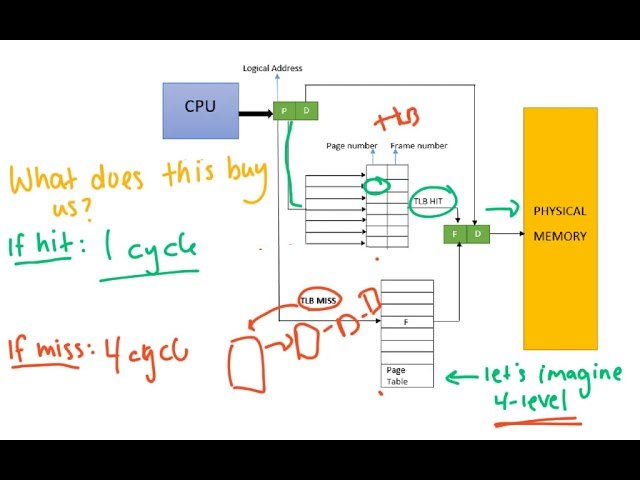
How many caches does a core have? 1-2-3-5? A core has many different caches for different tasks, and the caches for main memory are far from the fastest here. For example, there's a cache of decoded instructions, and you'll hardly ever think about its existence unless you're doing micro-optimization, when every other approach has already been tried.
There's the TLB cache, which is used to look up virtual-memory addresses. It's located separately because, even if the data is in the L1 cache, looking up any address would take several cycles. That's why a cache for virtual-address lookups exists, usually with a very limited size — dozens, at most hundreds, of entries. Yet a lookup in it takes one cycle or even less thanks to a dedicated management unit.
Speculative execution
Speculative execution became possible thanks to pipelined implementations and the presence of a branch prediction unit in CPUs, which reduced the cost of a conditional branch. Using data from the BPU, you can start executing a branch based on history before the branch's value is known — that is, ahead of the conditional jump. First the BPU determines which branch direction is most likely, and the CPU loads the next set of instructions associated with that branch. If the prediction was correct, the instructions are already prepared and there will be no execution delay. If the prediction was wrong, the CPU loads the required data and jumps to those instructions. However, the accuracy of branch predictors is usually above 95%, so the need to reload data arises rarely. Speculative execution appeared on Intel processors with the Pentium Pro and Pentium II, and on AMD with the K5 line.
Parallel computing
Another important innovation that changed the approach to software development and performance was support for multitasking and parallel computing at the hardware level. Once upon a time, multitasking in x86 was done only at the operating-system level, but with the appearance of Intel processors supporting Hyper-Threading (HT) it became possible to run two "threads" on a single physical core.
Thanks to HT and, later, many physical cores in the processor, we were able to run several programs or parts of a program physically in parallel, reducing wait times. In games, for example, this is used to split logic, audio processing, physics and rendering, where each core or thread can be busy with its own task. Modern processors, especially in consoles, may contain several specialized cores, which allows workloads to be distributed efficiently across threads.
The PS3 is built around the Cell BE (Broadband Engine) central processor. This processor was developed jointly by engineers from Sony, Toshiba and IBM. It has 8 cores. Only seven cores are working; the eighth is a spare, intended to improve performance by distributing power among the remaining cores. If one of the eight cores has a manufacturing defect, it can be disabled without having to declare the whole processor defective. The core clock is 3.2 GHz.
Non-cacheable memory regions
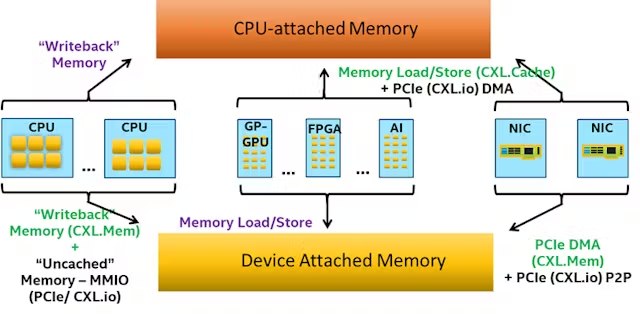
The CPU can't work with RAM directly: first the data lands in the cache, is fetched from there into registers, and processed. But this doesn't suit graphics cards, which, for example, need updates straight into the texture buffer. The solution was non-cacheable memory regions and mechanisms for working with them that let you avoid unnecessary cache usage. One feature of consoles has always been a media processor that can compress and decompress a video stream using most modern codecs at a fairly decent speed, around 150–200 frames per second — you just have to keep feeding it. But if you try to route the copying of these frames through the cache, you get a very depressing situation.
size      CPU->GPU
            memcpy
 ------ -------------
    256    44.44 Mb/s
    512    44.46 Mb/s
   1024    44.49 Mb/s
   2048    44.46 Mb/s
   4096    44.44 Mb/s
   8192    33.31 Mb/s
  16384    33.31 Mb/s
If we copy a Full HD video frame, which takes up 1920*1080*1.5 (NV12) = 3,110,400 bytes, we can only push 13 frames. Consoles provide convenient mechanisms to control memory mapping with different caching modes, and if you correctly use WC (write-combining — a write mode for non-cacheable memory) and do something like:
wc_fd = mdec_dma_open(SHM_ANON, O_RDWR | O_CREAT, 0);
mdec_dma_ctl(wc_fd, SHMCTL_ANON | SHMCTL_LAZYWRITE, 0, pix_buffer_mem_size);
mmap64(NULL, pix_buffer_mem_size, PROT_READ | PROT_WRITE, MAP_SHARED, wc_fd, 0);
close(wc_fd);
the wc_fd handle now points to memory with different access settings. The results will be completely different (PS5). Given that the memory is shared, there's no need to copy anything at all: the decoder places its data in memory, we take the CPU out of this chain, and all it has to do is mark the moments when the GPU may access this data:
size     VD->CPU->GPU  VD->GPU(WC)
            memcpy       memcpy
 ------ ------------- -------------
    256    44.44 Mb/s  2449.41 Mb/s
    512    44.46 Mb/s  3817.70 Mb/s
   1024    44.49 Mb/s  4065.01 Mb/s
   2048    44.46 Mb/s  4354.65 Mb/s
   4096    44.44 Mb/s  4692.01 Mb/s
   8192    33.31 Mb/s  4691.71 Mb/s
  16384    33.11 Mb/s  4694.71 Mb/s
The desktop variant has an LLC (Last Level Cache). A cache is called the LLC when it's the last one: for the CPU it will be the L3, and for the GPU it will be the L4. And it unites not only the CPU but other devices too. The graphics card watches writes into such memory regions and pulls them in by itself, without the CPU's involvement.
NUMA (Non-uniform Memory Access)
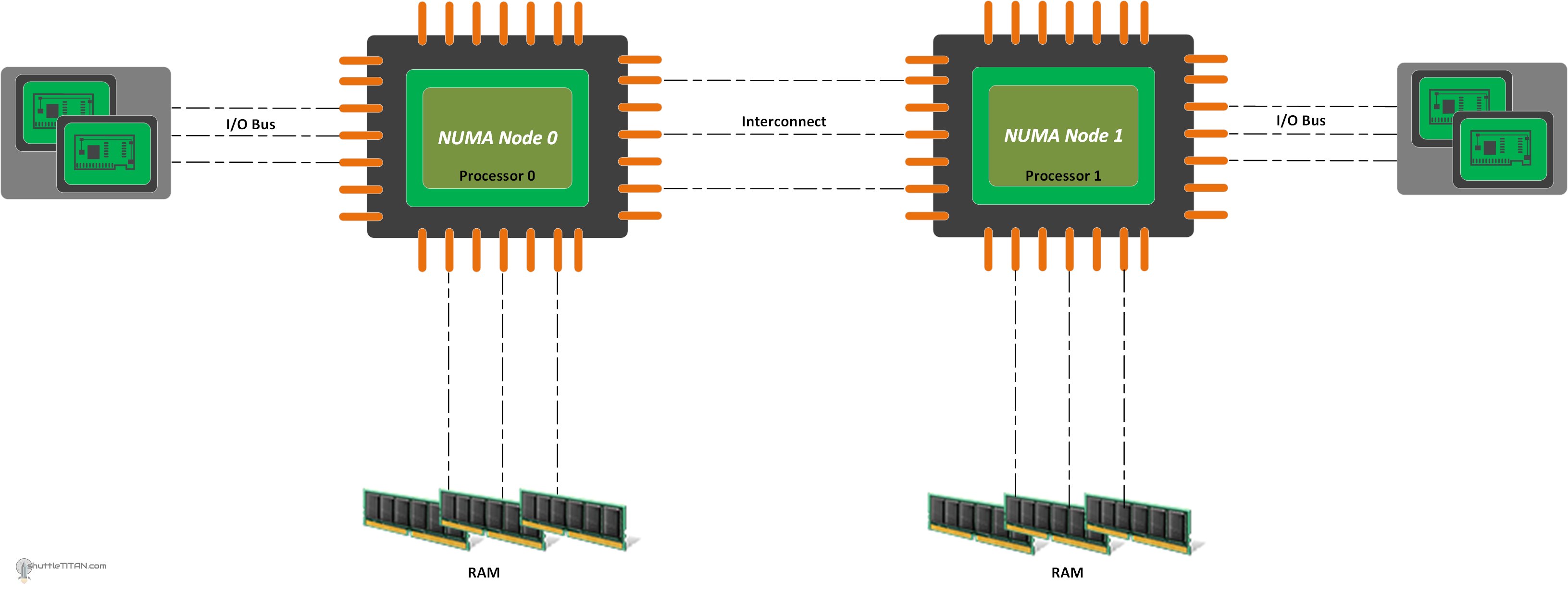
The non-uniform memory access (NUMA) architecture, where memory latencies and bandwidth differ, has become so widespread that it's perceived as the standard. Why did NUMA systems appear? Originally there was just memory, but as processor speed grew compared to memory, the memory could no longer deliver data fast enough, and a cache was added. The cache had to stay consistent with main memory, work an order of magnitude faster, but at the same time was substantially smaller in size. It also had to hold meta-information about the data so it would know when to write it back. If no write was needed, that improved performance, since such algorithms are the fastest.
Later, memory sizes became so large (gigabytes and terabytes of RAM) that a small cache was no longer enough to cover all the available memory. When working with large amounts of data, data was "evicted" from the cache and the algorithm started to run even slower than accessing main memory. Second-level and subsequent-level caches appeared so as, on one hand, to provide access to a large amount of RAM and, on the other, not to be too slow and to keep up with "feeding" the first-level cache.
The complexity of managing caches grew even more when there were several cores, each with its own cache. Data from RAM had to stay consistent with all caches. Before NUMA, each processor/core sent a message on a shared bus on every read or write operation, so other processors/cores could update their cache if needed.
This scheme worked for 2–4 processors/cores, but as their number grew, the time waiting for everyone's response became comparable to a single cycle, and the cache microcode became too complex to scale. The solution to this problem was using a shared mechanism per group of cores that tracks cache state for all cores in the group. Such a structure solves the cache-consistency problem within a group, but the groups themselves now need synchronization.
The downside of this approach was a performance drop when one group of cores accesses memory belonging to another group. In consoles and consumer systems (up to 64 cores), a ring bus is additionally used, which adds latency when passing messages between groups during memory access.
A bit about cache poisoning, and about cache coherence too, here.
SIMD (Single Instruction Multiple Data)
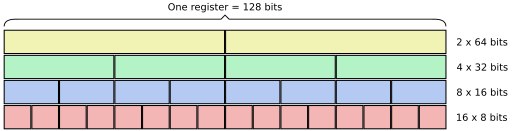
SIMD, first introduced into x86 as MMX in the 90s, made it possible to execute one instruction over several pieces of data at once, which significantly speeds up array operations, vector and graphics computations. For example, AVX/AVX2/512 (Advanced Vector Extensions) and SSE (Streaming SIMD Extensions) are more modern versions of SIMD, actively used in games, compute-heavy applications, image and video processing. These instructions let you compute over large data arrays, speeding up floating-point and integer operations in graphics, physics and machine learning.
Code such as:
for (int i = 0; i < n; ++i) {
  sum += a[i];
}
is recognized well by the compiler and gets vectorized. But something like the following already causes problems — and quite often the compiler balks even on simple examples:
for (int i = 0; i < n; ++i) {
  if (!a[i]) continue;
  sum += a[i];
}
The speed and efficiency of SIMD comes from the fact that processing, say, four numbers at once doesn't require extra cycles to process each number separately. Instead, the CPU performs the operation over four (or even eight) numbers at once. This optimization can increase performance by 2–4× on ordinary tasks and by an order of magnitude on special ones, but in most cases we get an x1.5–x2 boost on tasks — plus a dedicated person on the team who untangles it all.
Out-of-Order Execution
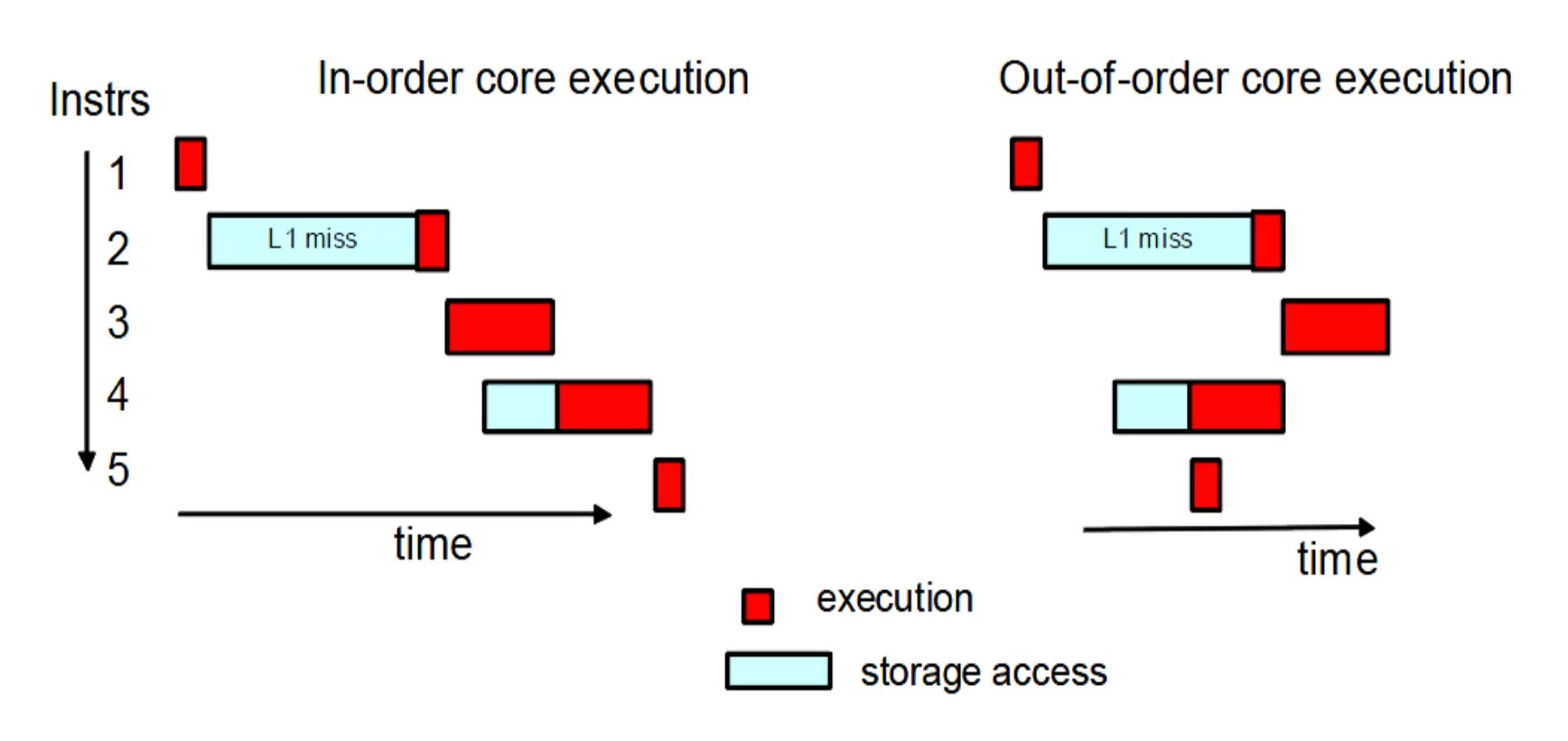
The 90s also brought the out-of-order execution mechanism, which lets the CPU "guess" which instructions can be executed while others are waiting for their data. This lets the CPU avoid idling while waiting for data to load from memory and keep working, executing other operations whose data is already available.
Modern CPUs can manage dozens of such "in-flight" operations at once. This helps significantly improve performance in situations where sequential instructions can get in each other's way, especially in the case of long computation chains. In games, where algorithms are deliberately reworked to reduce dependencies — for example, physical interactions and particle effects — this can bring some benefit and reduce latencies.
Power management
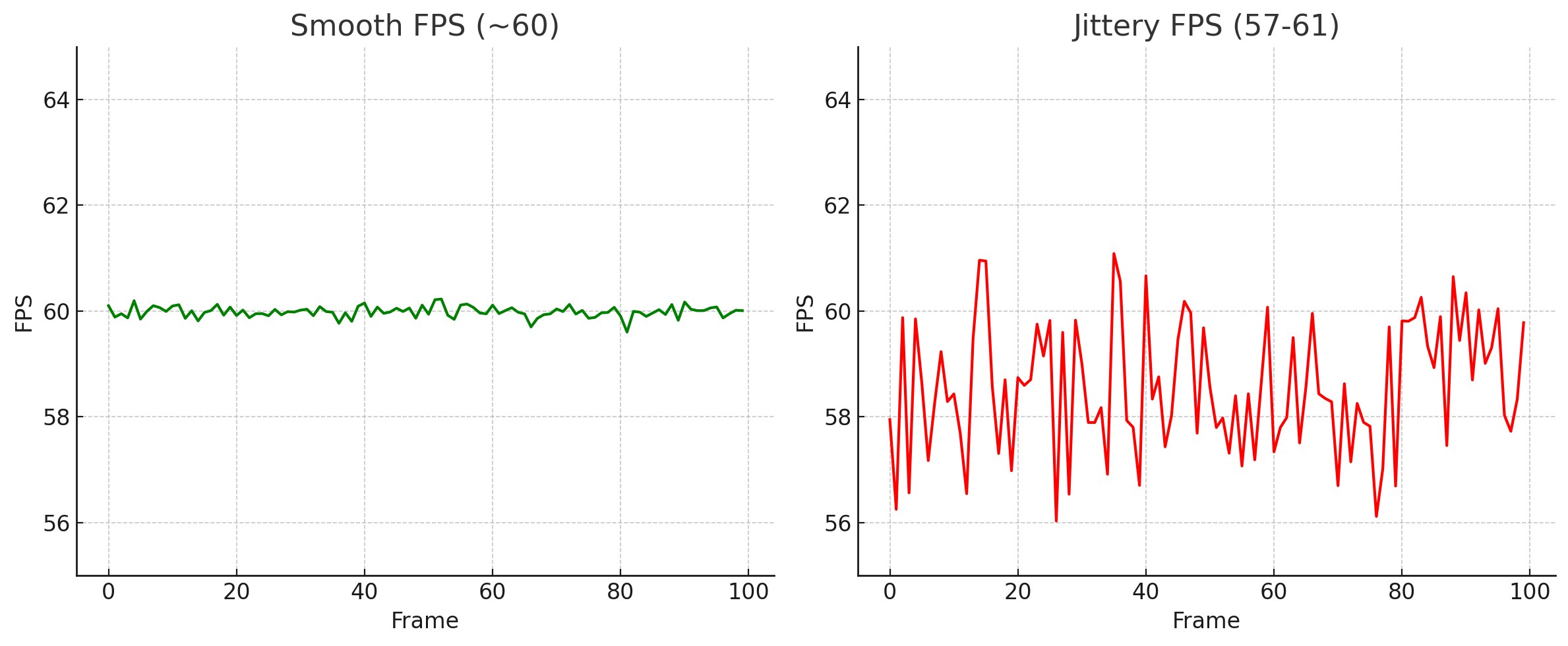
The picture above lets you estimate how much performance we lose to power management in heavy computations and the need to "wake" the CPU after idling — one of the studio's internal benchmarks for assessing whether a CPU is suitable.
Modern CPUs have arrived at "peak" performance algorithms and are equipped with many power-management features that reduce power consumption in various scenarios. Most modern applications need to ramp up to peak performance for a few seconds, do the task, and then drop to the minimum frequency to save energy. This makes the "race to idle" approach (doing tasks as fast as possible and then putting the CPU into idle) the most efficient. For games, however, this approach doesn't work: game developers have spent years trying to load CPUs as heavily as possible, keeping them at high performance for as long as possible. This prevents CPUs from entering power-saving mode, which is critical for games. The problem is that reaching working frequencies takes significant time, which causes frame hitches and unstable response times. In some cases you even have to come up with code that runs in the background to keep cores from entering power-saving mode when the main threads have nothing to do. This is especially noticeable on the latest generations of power-efficient processors. On the left is a mobile Ryzen 9-4900HS/RTX2060 on internal tests with power management disabled in the BIOS; on the right is the same one with an active plan. The same laptop, but this jitter comes from the constant wandering of the CPU frequency, every 4–5 frames; N benchmark runs, each a couple of seconds long, recording the maximum frame time on each run.
GPGPU
Until the mid-2000s, graphics processors (GPUs) were limited by an API that gave only basic control over the hardware. But when a system effectively has a second processor with its own memory, often not inferior to the main one, the question arises: "why is it idling?" So people started using graphics cards for a wider range of tasks — for example, linear-algebra problems, which are perfectly suited to parallel computing. The GPU's parallel architecture could handle large matrices, for example 512×512 and larger, which an ordinary CPU coped with very poorly, to put it mildly. As an interesting read, see Igor Ostrovsky's article on this topic.
Initially the libraries used traditional graphics APIs, but later Nvidia and ATI noticed this trend and released extensions that gave us access to more hardware features. At the top level a GPU contains one or more streaming multiprocessors (SMs). Each such processor usually contains several compute units (cores). Unlike CPUs, GPUs lack a number of features such as large caches or branch prediction, or they are heavily cut down compared to CPUs. So tasks well suited to GPUs have a high degree of parallelism and contain data that can be split among a large number of threads.
GPU memory is divided into two main types: global and shared. Global memory is GDDR, whose size is printed on the GPU box and is usually 2 GB and up; it's accessible to all threads on all SMs and is the slowest memory on the card. Shared memory is used by all threads within a single SM. It's faster than global memory but inaccessible to threads in other SMs. Both categories of memory require strict access rules: violating these rules entails a significant performance drop. To achieve high bandwidth, memory access must be organized correctly for parallel use by threads of a single group. Just as a CPU reads data from a single cache line, a GPU's cache line is designed to serve all threads in a group when properly aligned. Manufacturers try to increase the cache-line size to allow as many SMs as possible to access it simultaneously. But this only works if all threads access the same cache line. In the worst case, when each thread in a group accesses different cache lines, a separate read is required for each thread, which reduces the effective memory bandwidth, since most of the data in a cache line goes unused.
Why did I put this under the CPU? Since we started using GPUs to solve a general range of tasks, why not consider them in this context?
Virtual memory
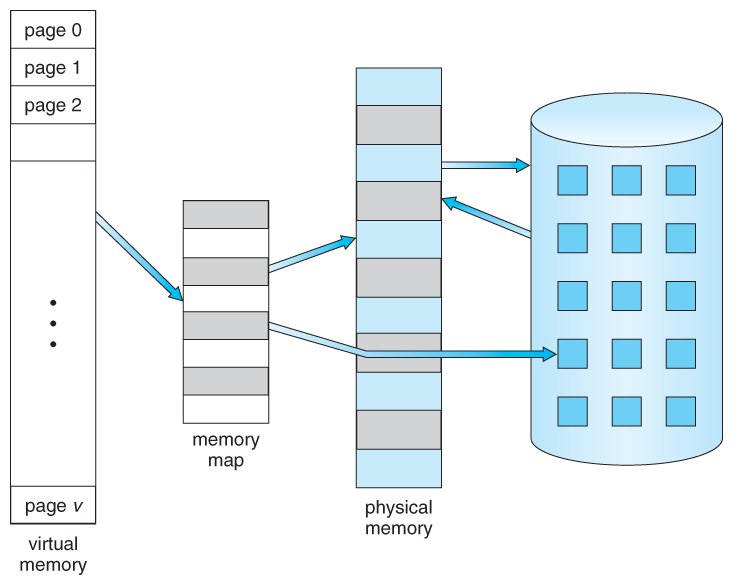
This is another one of those "new" features you don't have to think about unless you're developing an operating system. Virtual memory is far simpler to use than segmented memory, but that topic is no longer relevant, so we can stop here. Virtual memory uses both hardware and software means to compensate for a shortage of physical memory by temporarily moving data from RAM to disk. Mapping fragments of memory to files on disk lets the computer treat secondary memory as if it were main memory. A good article to get familiar with it is here.
SMT / HT
Its use is mostly transparent to programmers, but it's important to know a couple of things. The typical speedup from enabling HT on a single core is around 25% for general-purpose programs. It improves overall throughput by letting you load the core with more data from two execution threads, but each thread on the core may lose performance. For games, where high single-thread performance matters, it's more beneficial to disable HT so that third-party applications poke into the cache less and interfere less. Even if we pin a thread to a specific core, we still can't utilize more than 80% of the core's time: even with utilization numbers close to 75–80%, we'll have switches to frames of other threads. As an example from real life: a modeler's game would drop to 50 fps simply if Houdini was running in the background — minimized and "doing nothing," but still actively using the first core, on which the game's main thread was running; the dependency was on Intel's 12700 line. After disabling HT the situation improved slightly to 55 fps, and in PIX you could see that Houdini's execution blocks still squeezed onto the first core. A stable 60 was achieved only by closing the 3D package, although a lot depends on the specific load and the hardware, because on AMD there was no such dependency.
Another side effect of chip complexity is that performance has become less predictable than before, especially on mobile chips. There's a good paper from NASA on why you'll be lucky to get a 30% boost there, not the 2× everyone hopes for :)
BPU (Branch Prediction Unit)
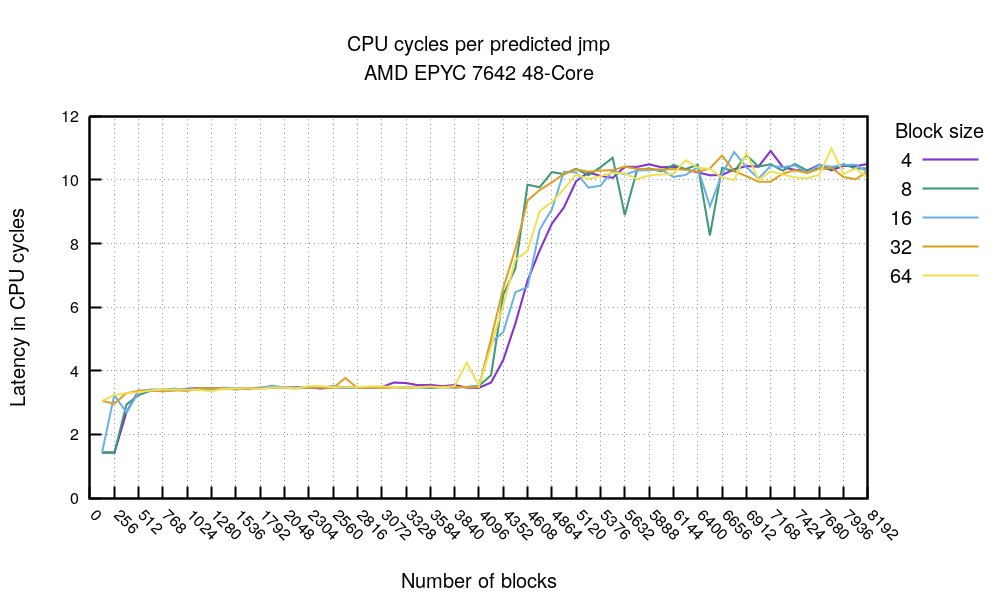
Degradation of single-branch execution time as if-nesting depth increases
The branch prediction unit is a separate part of the CPU, a mini-processor with its own firmware, memory, caches and so on, which predicts the outcome of conditional branches in the instruction stream. In modern CPUs branch prediction has become critically important for performance growth, since it lets you cut down stalls in the instruction pipeline and use its resources more efficiently. In the latest generations of Intel processors the BPU block can take up to 15% of the core's die area, and the volume of BPU microcode is comparable to the volume of all the rest of the microcode. However, building large and deep BPU blocks has become an extremely complex task, which is why blocks deeper than 64 nesting levels are practically never designed.
The BPU itself consists of several parts:
- Branch Prediction Table (BPT) — stores the prediction history for various branch instructions, recording the instruction address and the branch status (e.g. "taken" or "not taken").
- Branch History Buffer (BHB) — stores the sequence of recent branches to increase prediction accuracy, taking the program's past behavior into account for more precise prediction of the current branches.
- Branch Target Buffer (BTB) — stores branch target addresses, allowing a faster jump to the right point in the code on a successful prediction. The BTB also helps load into the L1 cache the data that may be needed in that branch.
- Last Recent Branch Buffer — stores the last N branch addresses (usually no more than 64). The lookup is done first in this fast cache; if no answer is found, a lookup in the BPT is performed.
An interesting article on the topic.
From my very first day working in programming, experienced colleagues warned that branches slow down code execution and should be avoided. On Intel 12700-series processors the penalty for a branch misprediction is 14 cycles. The misprediction rate depends on the complexity of the code and the overall nesting depth. By my latest measurements on projects (PS4/5), the misprediction rate was between 1% and 6%. Numbers above 3% are considered significant and can be a signal to optimize the code.
However, if a correctly predicted branch takes just 1 cycle, the average cost of a branch comes out to:
- at 0.5% mispredictions: 0.995 × 1 + 0.005 × 14 = 1.065 cycles;
- at 4% mispredictions: 0.96 × 1 + 0.04 × 14 = 1.52 cycles.
After such measurements on real projects, we became less picky about the presence of ifs, as long as they don't make the code harder to read.
Researching material for an internal studio talk on branching, I came to the conclusion that this penalty isn't all that critical, given that on average only 5% of predictions are wrong. Unpredictable branches are a minus, but most of them lend themselves well to profiling in hot functions and are clearly visible in both PIX and Razor. It makes sense to optimize an algorithm only where the profiler reveals problems. Over the last twenty years CPUs have become more resilient to unoptimized code, and compilers have learned to optimize it, so optimizing branches with various crutches and hacks from the late 90s is no longer as relevant and is mainly needed for squeezing out maximum performance during post-profiling stages of a release.
A good lecture on the topic.
And one more observation about branches: modern CPUs (XBOX, PS4, PS5, almost all mobile chips) ignore branch-prediction hint instructions, but such hints help the compiler lay out the code better. The CPU itself relies solely on the BPU, not on "hints" from the programmer.
Thanks for reading! If I forgot to mention something, write in the comments.
← All articles