Bazaar


The Bazaar is the final link in the food and goods distribution chain. It sends buyers to collect food from Granaries and goods from Storage Yards, then dispatches traders to roam nearby streets and supply whatever housing needs to evolve or avoid devolving.
Without a Bazaar within walking range, housing cannot receive food or goods regardless of how many Granaries and Storage Yards are nearby. Every residential cluster needs at least one Bazaar.
At high neighbourhood desirability (≥ 30) the Bazaar upgrades its appearance — one of its open-air stalls is replaced by a small enclosed building — and begins sending out two traders simultaneously instead of one.
Stats
- Cost (Normal)
- 30 Db
- Cost by difficulty
- VE 8 · Easy 15 · Normal 30 · Hard 50 · VH 100
- Inventory
- 4 food types + 4 goods
- Search radius
- 40 tiles
- Labor category
- Infrastructure
- Fire risk
- Medium (4)
- Damage risk
- Low (2)
- Overlay
- Bazaar Access
Overview
Ancient Egyptian markets ranged from small neighbourhood stalls to busy trading centres on the Nile banks. Goods changed hands through barter — money as we know it did not exist in pharaonic Egypt — and market women were a common sight carrying baskets of bread, fish, and vegetables. Wall paintings and papyrus records document lively scenes of exchange, with traders haggling and tax collectors recording transactions.
In the game the Bazaar abstracts this into a two-stage operation: first, specialised buyers fetch bulk supplies from storage buildings, then traders disperse through the streets supplying individual houses with whatever they need at that moment.
Mechanics
Buyers (OG vs Enhanced)
In original Pharaoh each Bazaar fields one market buyer at a time. That buyer fetches a single food or goods type per trip (priority prefers empty food slots, then empty goods, then lowest stock under thresholds). Food comes from Granaries; goods from Storage Yards (food sitting in a yard can also be collected as a good haul).
Enhanced option gameplay_change_bazaar_multi_buyers
(default OFF; Options → gameplay changes) allows up to two concurrent buyers
(max_buyers: 2 in building config). While one buyer is out for food, the
second prefers goods (and the reverse); if the opposite group has no reachable target,
it falls back to another item in the same group. Goods demand counters tick only on a
successful pick while no buyers are already out (failed complementary probes do
not burn demand). Labor seeker and trader slots are unchanged. Return cooldown
(figure_spawn_delay = -3) applies only when the last active buyer comes home.
With the option OFF, a leftover second buyer is cleared on the next spawn.
Enhanced option gameplay_enhanced_food_mill
(default OFF) makes buyers fill food variety before empty goods, and unlocks the
Food Mill — a staging store bazaars prefer
for multi-type food pickups. See that page for Desired / Minimum orders and the
farms → granary → mill → bazaar chain.
Each buyer is a destination walker: she walks to a specific Granary, Storage Yard, or Food Mill, loads up, and returns. Helpers carry large hauls. Search radius is 40 tiles from the Bazaar.
Bazaar trader
The trader is a roaming walker: she has no fixed destination and chooses randomly at each intersection. As she passes within two tiles of housing, she supplies whatever that house needs from her current stock. She also notes unmet demands and reports them back to the buyer.
Priority is always to prevent devolution first — a house in danger of losing a tier gets resupplied before a house that wants to upgrade. Once basic needs are met, the trader supplies goods for evolution.
Because the trader chooses randomly at intersections, road layout strongly affects coverage. A long, straight road from the Bazaar gives good linear coverage. A grid gives unpredictable coverage. Use Roadblocks to steer traders away from streets you do not want served.
Walkers

Fetches food from Granaries

Carries loaded goods back to the Bazaar

Distributes goods to nearby housing
Inventory
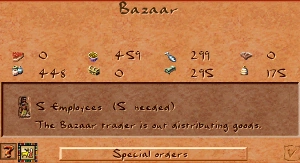
The Bazaar can hold up to 4 food types and 4 goods types simultaneously. Right-clicking shows current stock in two rows — food icons on top, goods icons below. Items shown in yellow are stocked but toggled off in Special Orders (the buyer will not replenish them).
- Up to 4 food types
- Determined by the city's available food resources
- Buyer restocks when a slot falls below threshold
- Pottery
- Luxury goods
- Linen
- Beer
Special Orders
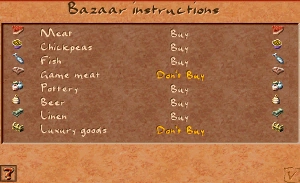
Right-click the Bazaar and press Special Orders to toggle each commodity on or off. A toggled-off commodity is shown in yellow in the info panel — the Bazaar keeps whatever stock it has but the buyer will not go out to replenish it.
This is useful for:
- Specialising Bazaars. Give one Bazaar grain and pottery, another beer and linen. Housing blocks served by both stay well-supplied without either Bazaar competing for the same goods.
- Preventing unwanted evolution. Suppress luxury goods in a housing block you want to keep at a lower tier to avoid population surges.
- Stockpiling for trade. Turning off a commodity at the Bazaar keeps it in the Storage Yard where it can be exported instead of consumed.
Upgrade
When the desirability of the Bazaar's tile reaches 30 or above, the building automatically upgrades its appearance — one of the open-air stalls becomes a small enclosed structure. The upgraded Bazaar sends out two traders simultaneously instead of one, effectively doubling neighbourhood coverage.
The upgrade triggers automatically and costs nothing. It reverts if desirability drops back below the threshold. Placing Gardens, Statues, or other desirable buildings nearby is the easiest way to push a Bazaar over the threshold.
Placement
Place the Bazaar within 40 tiles of at least one Granary and one Storage Yard. Beyond 40 tiles the buyers simply cannot reach them.
Place the Bazaar close to housing. The trader is a roaming walker — the farther she has to travel before reaching houses, the less efficiently she distributes. Ideally the Bazaar sits at the entrance to or inside the housing block it serves.
The Bazaar has mild negative desirability (−2 at the tile, fading to neutral within 3 tiles). Because it needs to be close to housing anyway, offset the penalty with a few Gardens or Statues nearby. A high-desirability location also earns the Bazaar an upgrade and its second trader.
Road access is mandatory — all three walkers travel on roads.
Tips
- If a Bazaar's trader is not reaching certain houses, check the road layout. The trader will avoid dead-ends after the first visit and may never return to a side street. Try connecting it to a loop road so the trader can always find a path onward.
- A single Bazaar typically serves around 400–600 citizens adequately. Add a second Bazaar when housing demand outpaces supply, not when housing is first built.
- If the food buyer is idle (standing at the Bazaar), either the Granary is over 40 tiles away, the Granary is empty, or the relevant food type is toggled off in Special Orders.
- Fire risk is medium (4). An Firehouse patrol should cover the Bazaar — market stalls burn quickly.
- To push a Bazaar past desirability 30 for the free second trader: place two small Gardens adjacent to it. Gardens give +5 to +10 desirability each, often enough to cross the threshold.
- Use the Bazaar Access overlay (toggle button in the info panel, or via the Overlays menu) to see exactly which tiles the trader covers. Uncovered tiles appear dark.
In the original game
Screenshots from Cleopatra: Queen of the Nile (Impressions Games, 2000).
Developer reference
All paths relative to the repository root.
Building config — src/scripts/buildings.js
The Bazaar definition is inside src/scripts/buildings.js at the building_bazaar block (line 234).
building_bazaar {
  animations {
    base        { pack:PACK_GENERAL, id:22 }          // standard appearance
    fancy       { pack:PACK_GENERAL, id:45 }          // upgraded appearance (des ≥ 30)
    base_work   { pack:PACK_GENERAL, id:22, offset:0 }
    fancy_work  { pack:PACK_GENERAL, id:45, offset:0 }
  }

  building_size               : 2
  meta                        { help_id: 2, text_id: 97 }
  cost                        [ 8, 15, 30, 50, 100 ]  // VE … VH
  laborers                    [5]
  fire_risk                   [4]
  damage_risk                 [2]
  desirability                { value[-2], step[1], step_size[1], range[6] }

  max_search_distance         : 40   // tiles buyer will travel
  fancy_treshold_desirability : 30   // upgrade threshold (note: typo in original)
  min_houses_coverage         : 50
  minimal_pick_food_amount    : 100  // min units per food pickup trip

  // Restock thresholds: buyer fetches food when stock drops below these levels
  pick_food_below [600, 400, 200, 100]
  pick_good_below [150, 100, 50,  25]
  max_buyers : 2   // Enhanced multi-buyer cap (flag OFF = still 1)

  overlay     : OVERLAY_BAZAAR_ACCESS
  flags { is_food: true }
}
To change the buyer's maximum travel distance, edit max_search_distance. To adjust the upgrade threshold, edit fancy_treshold_desirability. The pick_food_below array controls at what stock level (per slot) the food buyer makes a new trip — lower values mean less frequent restocking.
C++ implementation — src/building/building_bazaar.h / .cpp
src/building/building_bazaar.h declares building_bazaar (inherits building_impl). Key runtime data:
struct runtime_data_t {
    resource_value inventory[8];   // slots 0–3 food, 4–7 goods
    short pottery_demand;
    short luxurygoods_demand;
    short linen_demand;
    short beer_demand;
    short fetch_inventory_id;
    sbitarray16 market_goods;       // bitmask of toggled-on goods
};
Key methods:
spawn_figure()— spawns buyer(s) and trader based on stock and staffingpick_next_buyer_destination()— Enhanced complementary / same-group fallback pickget_storage_destination()— returns the Granary or Storage Yard the buyer should walk toupdate_graphic()— switches betweenbase/fancyanimation based on current desirabilityidx_accepted(index)— returns true if slot index is toggled on in Special Orderstoggle_idx_accepted(index)— flips the Buy/Don't Buy state for a slotmax_food_stock() / max_goods_stock()— maximum inventory per category
JavaScript bindings in src/building/building_bazaar_js.cpp expose bazaar state to mission scripts (e.g. checking if the bazaar is active).
Info window — src/scripts/ui_bazaar_window.js
The right-click panel is defined in src/scripts/ui_bazaar_window.js as a bazaar_info_window bound to both BUILDING_BAZAAR and BUILDING_BAZAAR_UP (the upgraded variant). Window size: 29×17 tiles.
bazaar_info_window {
    related_buildings [BUILDING_BAZAAR, BUILDING_BAZAAR_UP]
    ui {
        background   : outer_panel({size[29, 17]})
        title        : text({font: FONT_LARGE_BLACK_ON_LIGHT, align:"center"})
        warning_text : text({pos[32, 36], wrap:px(27), multiline:true})

        food0_icon   : resource_icon({pos[32,  85]})    // food row y=85
        food1_icon   : resource_icon({pos[142, 85]})
        food2_icon   : resource_icon({pos[252, 85]})
        food3_icon   : resource_icon({pos[362, 85]})
        good0_icon   : resource_icon({pos[32,  110]})   // goods row y=110
        good1_icon   : resource_icon({pos[142, 110]})
        good2_icon   : resource_icon({pos[252, 110]})
        good3_icon   : resource_icon({pos[362, 110]})

        workers_panel: inner_panel({pos[16, 136], size[27, 4]})
        orders       : button({text:"${98.5}", onclick: show_window_by_id("bazaar_orders_window")})
    }
}
The warning_text field shows the current walker status: both active, buyer only, trader only, or "no goods stocked." Text strings come from the building's meta_text_id (97) — text group 97 in the localisation file, entries 1, 4, 10, 11, 12.
Game messages — src/scripts/game_messages_en.js
| Key | ID | Line | When shown |
|---|---|---|---|
message_bazaar_history |
2 | 15 | Help panel linked from the [?] button in the info window (help_id: 2). Covers buyer/trader mechanics, Special Orders, road planning, and desirability. |
Building name string: text group 97, entry 0 (text_id: 97). Walker status strings are in group 97 entries 1–12. To change the in-game building name, update the localisation file at text ID 97.